Mobile booking app

Little Helper

man walking in front of textured wall

CONTEXT

Little Helper is a mobile booking app for teams and HR managers so that they can quickly book a room without going to their workplaces.

KEY RESULTS

Booking time reduced by

70%

User satisfaction

92%

CHALLENGES & GOALS

  • Create convenient meeting rooms booking app
  • It should be clearly visible if the meeting room is busy or freefrom a few meters
  • Person should be able to see statuses of other meeting rooms from one tablet
  • Person should be able to see the schedule for this day
  • Any booking room should be able to be booked from any tablet

CLIENT

IT company's internal project for more than 400 employees

TEAM

Designer (me), manager and android Engineer

MY ROLE

Interviewing, concept creating, prototyping, interaction and visual design, user-testing
man walking in front of textured wall

DEFINING THE PROBLEM

The company has offices on several floors. Employee can book a meeting room only from their workspaces or go and check every meeting room.

A lot of managers asked to have the opportunity to book a room when they stay near it, so that they don't need to go to another floor to their room and lose time.

SOLUTION

We created an app for tablets that were hung next to each meeting room, so now employees don’t have to waste time to find out which rooms are free and which ones are busy. First mvp version was created by manager and developer to find technical capabilities and limitations. After that they decided to ask for my help as a designer to find best solutions, work through use cases and visual style.

The application has been implemented and successfully using for more than six month. We got a lot of positive feedback.

APPROACH

Booking a room should be simple and effective case during employee work day, such things shouldn't irritate people or distract business meetings. I realised the importance of creating a streamlined approach for people to not only give people possibility to book a room here and now but also recognise process which I called 'meeting routine'.

How and why do people hold meetings?What pain points do employees experience when trying to book a room?
Product goals

ACCURATE

Timetable for 'today' is reliable, person can see which rooms are booked and which ones are free for certain time

ACCESSIBLE

The booking feature can easily be found and accessed and frictionless to save time

EFFICIENT

The booking process is smooth and frictionless to save time for business tasks and meetings

Long term goals

PRESENTABLE

Application can become our portfolio project in which other customers can be interested in

RESEARCH

I interviewed project and HR managers, because they book rooms more often than any other employee. I asked them about their meeting routine, how offten do they book a meeting room, how long ususally meeting lasts, with whom they they hold meeting, etc. Answers to these questions provided me insights what should and shouldn't be in the app.


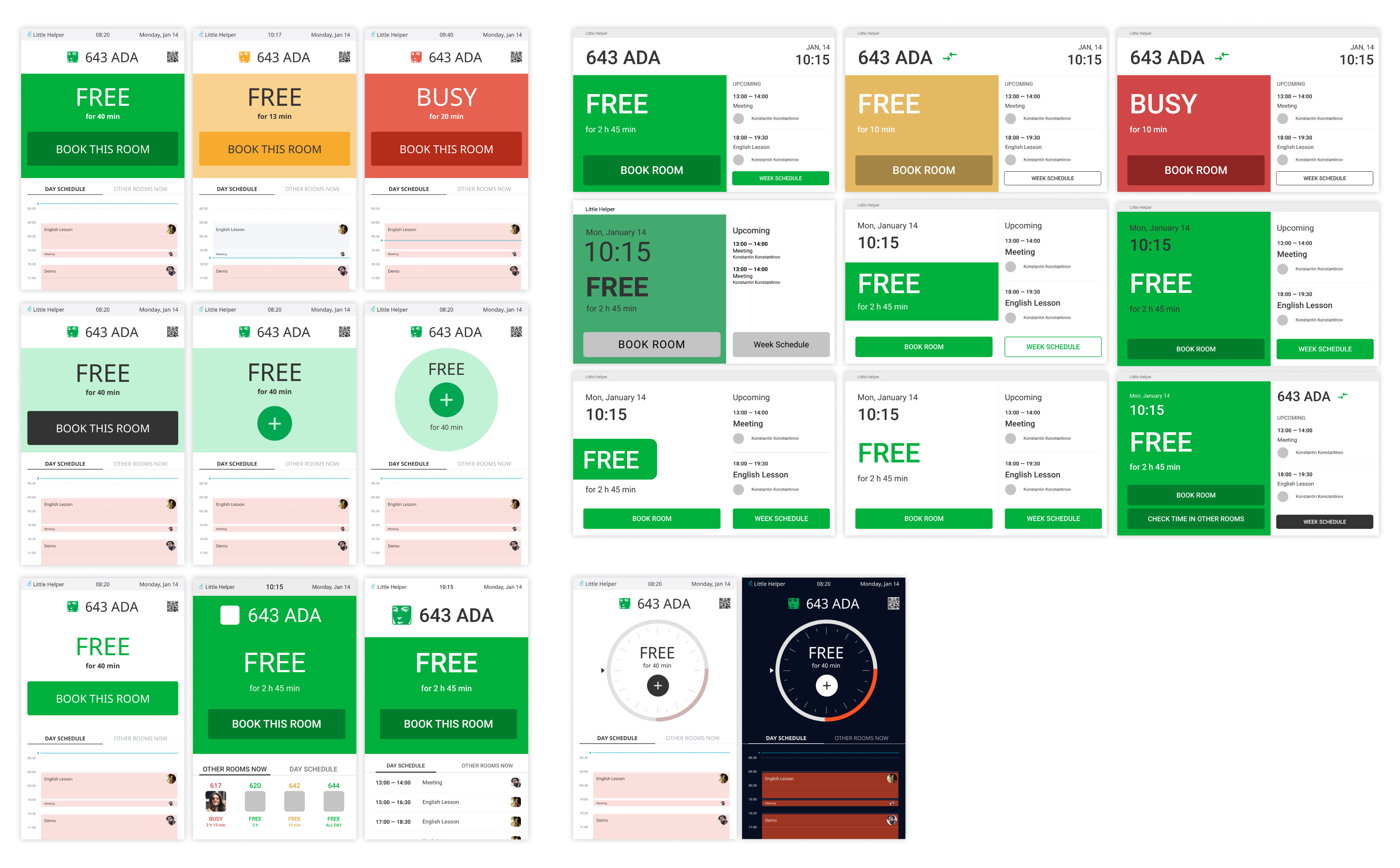
When translating the pain-points into ideas I developed a set of prototypes. I started working with color, although shades were approximate and rough, I needed to see how layout would look like with green and red and determine the amount of color on the screen.

man walking in front of textured wall

I presented to the team results of the interview and my ideas with these sketches how we can solve problems and achieve our goals. Collaborating with developer and manager we diverged to possible features and then came together to determine the necessary ones.

MOODBOARD

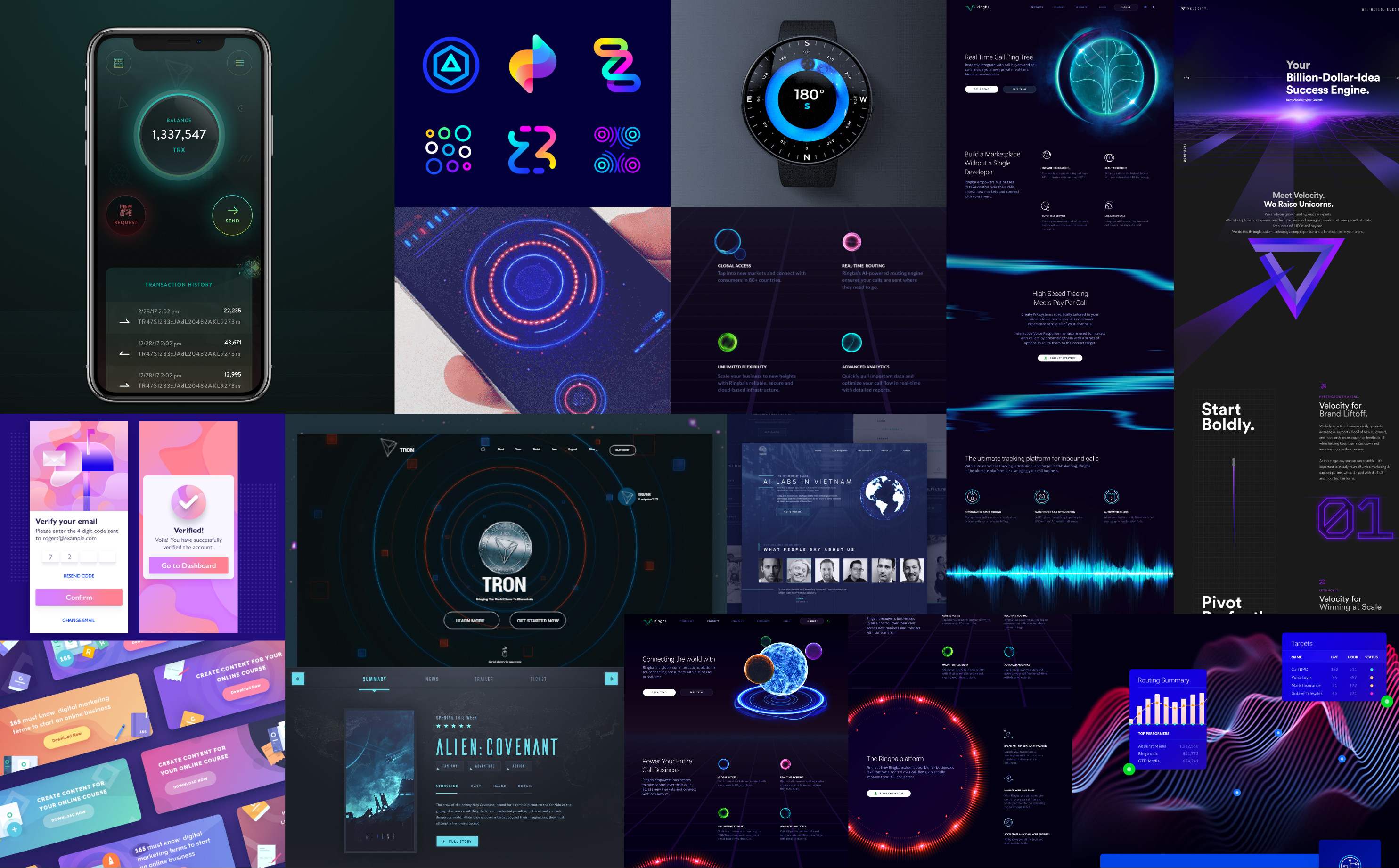
After finalazing user experience workflow I started working on visual design. We decided to develop the app in dark colors and futuristic style.

man walking in front of textured wall

USER TESTING

I prepared an interactive prototype and we asked our group of respondents to book a room here and now, to book for the future time, to view the room's schedule for today and what other rooms are available. We were able to test the team’s hypotheses and make a final decision that would suit everyone.

man walking in front of textured wall

Final outcome

MAIN SCREEN

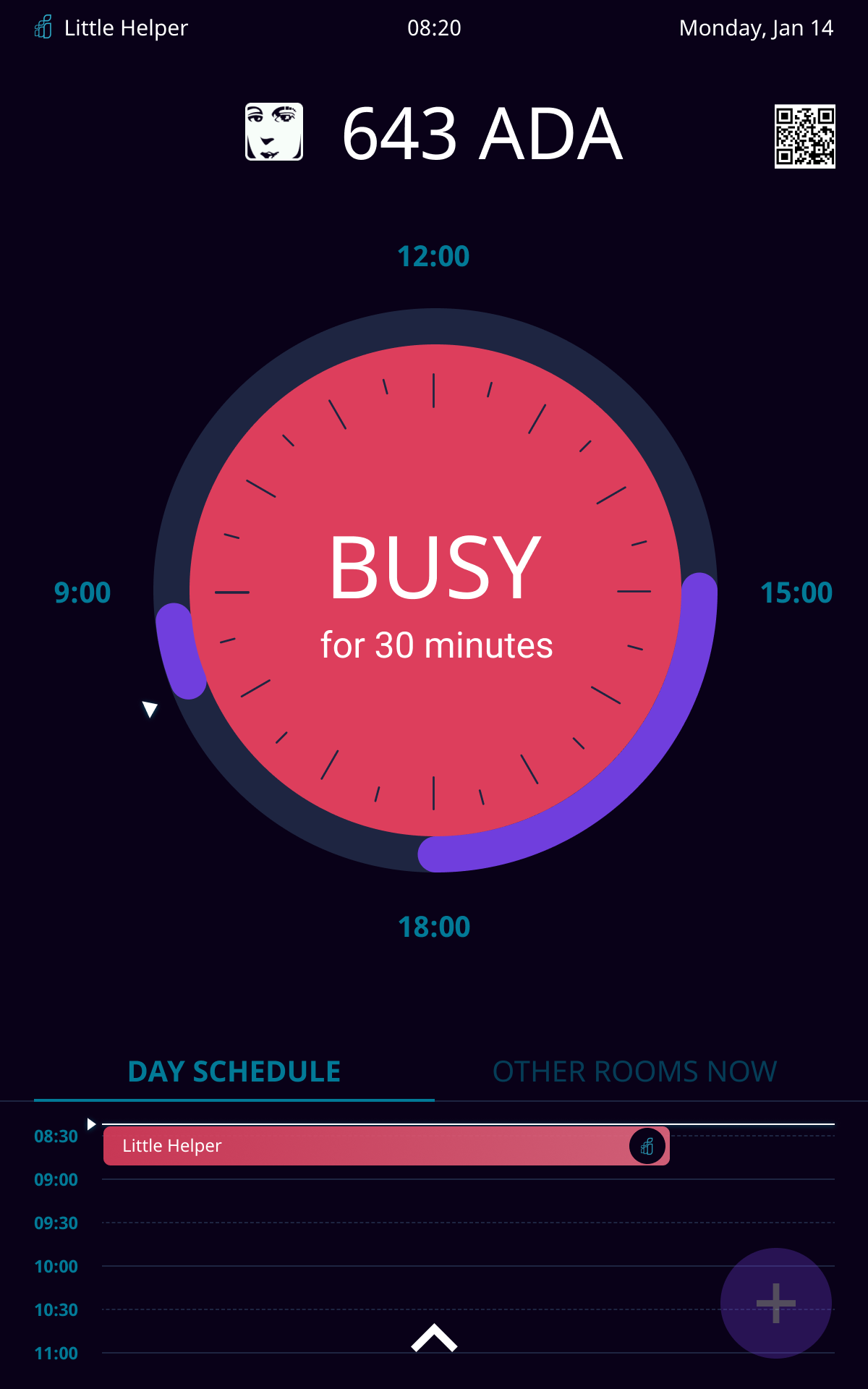
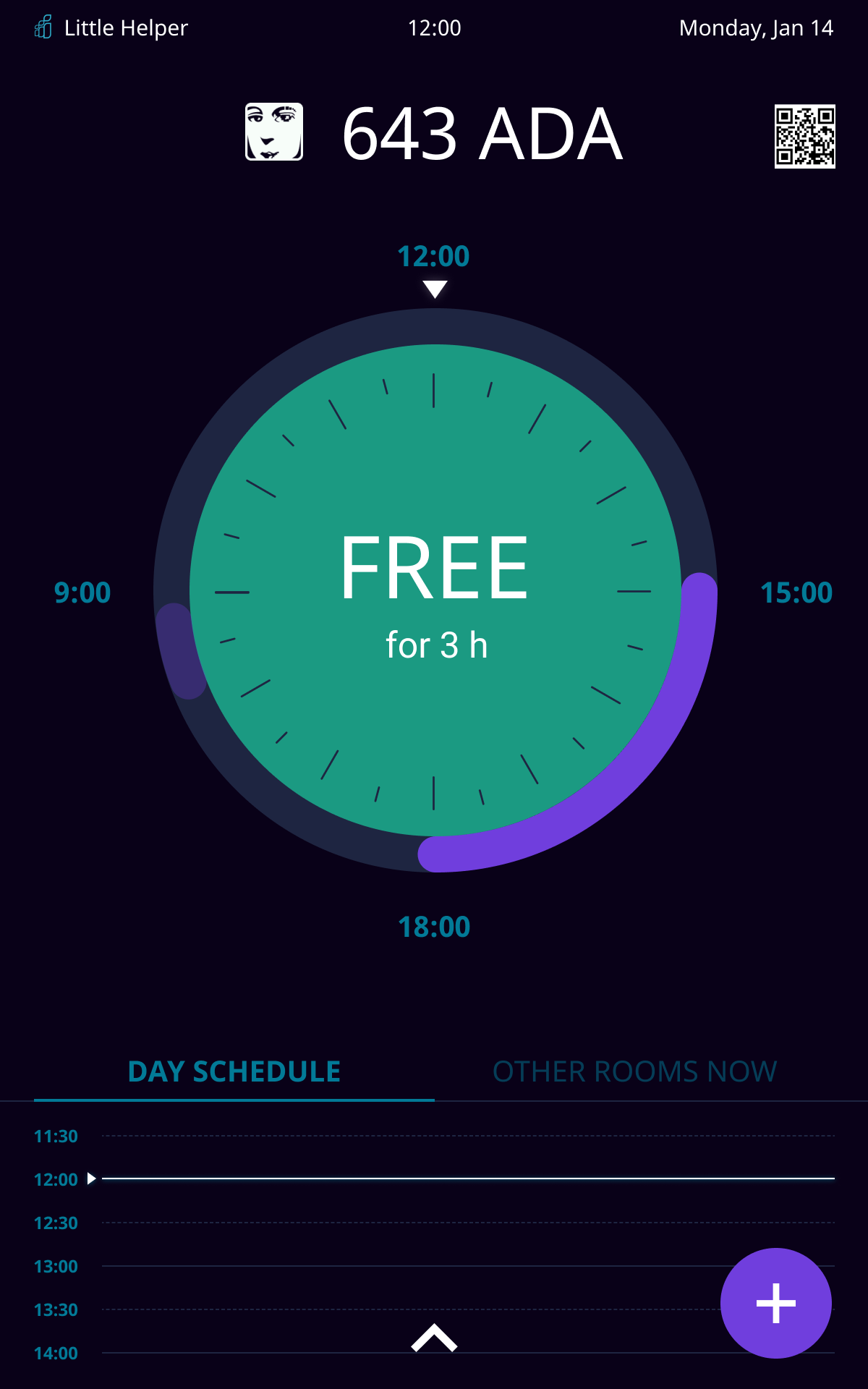
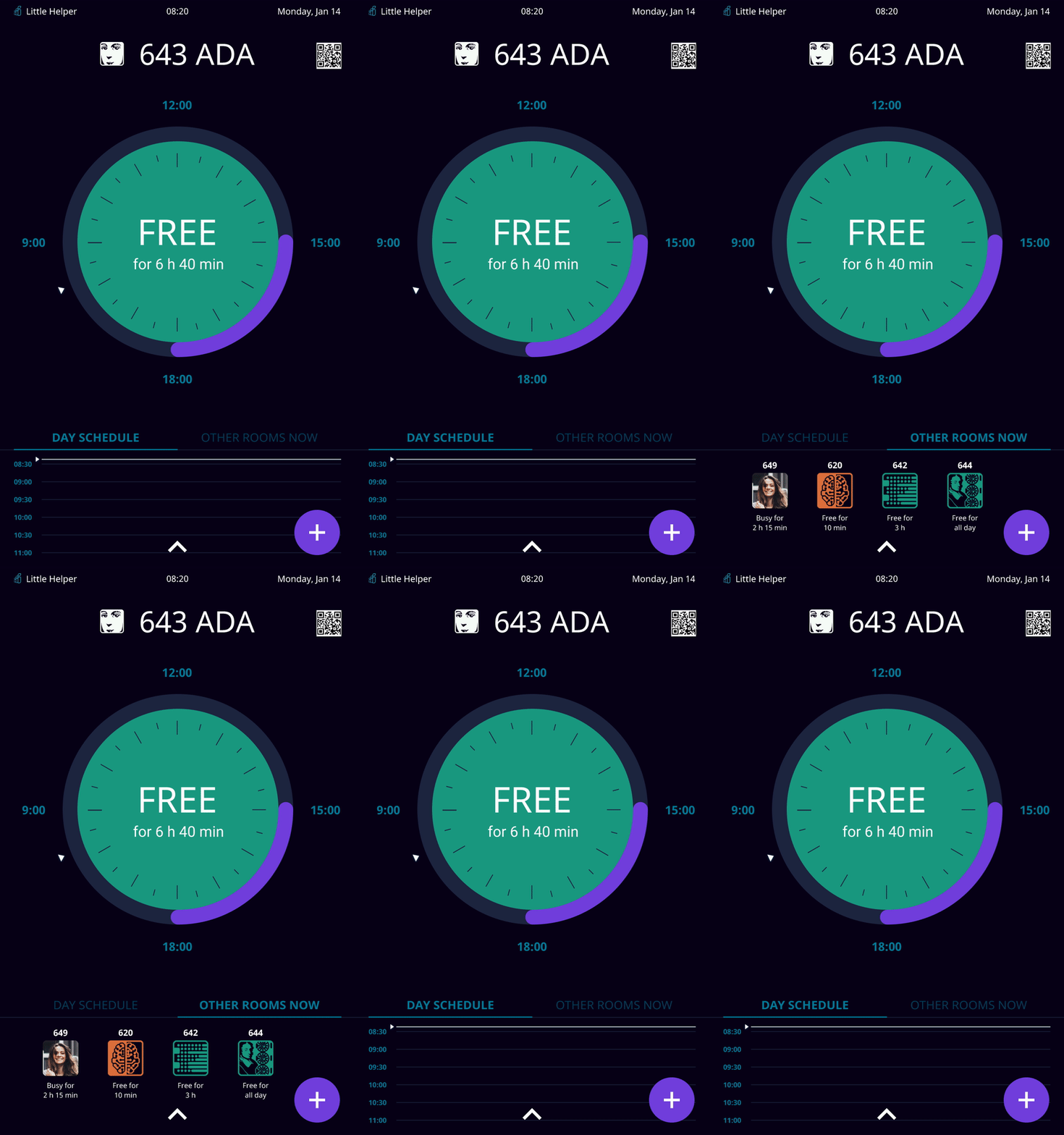
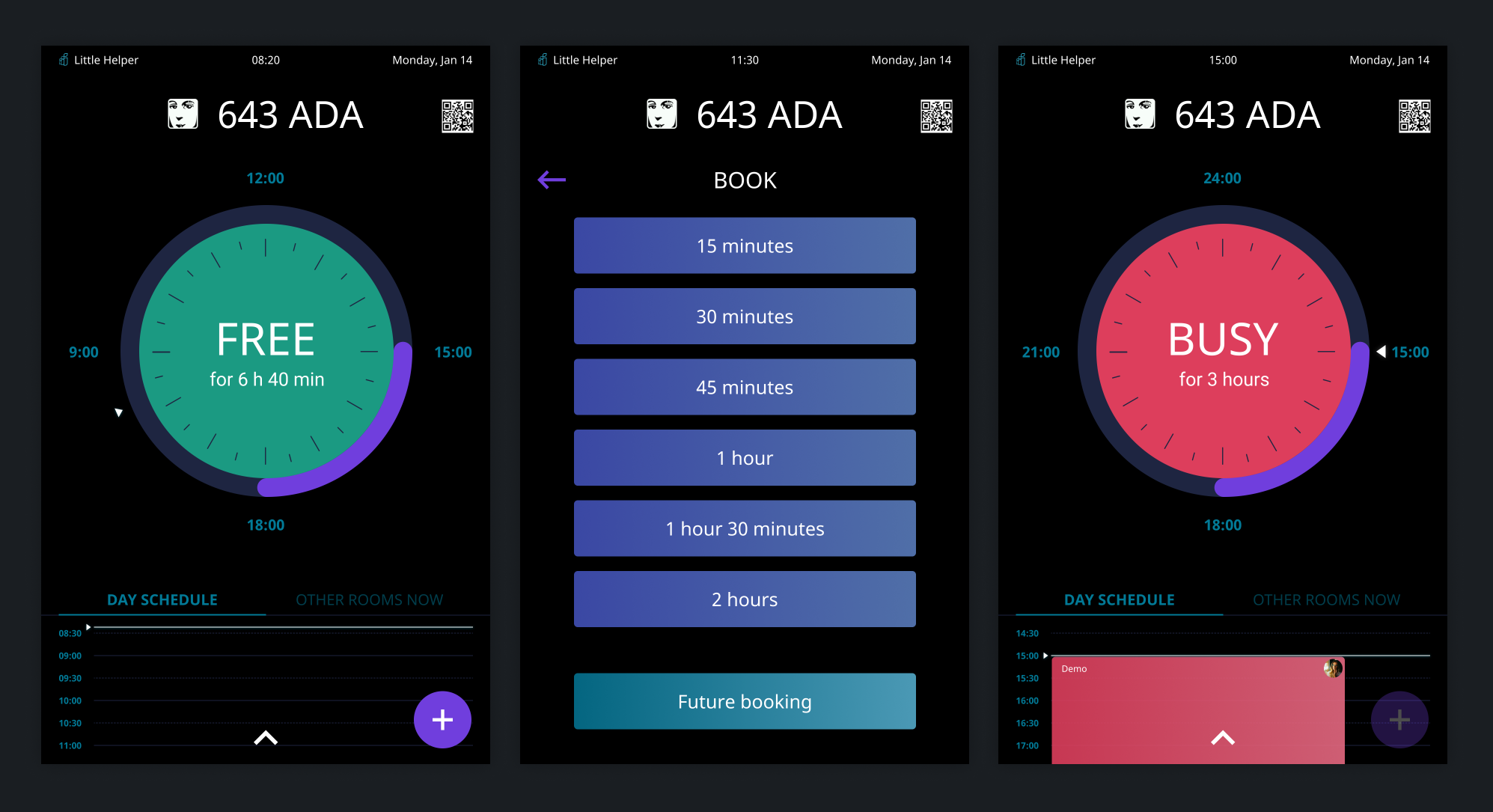
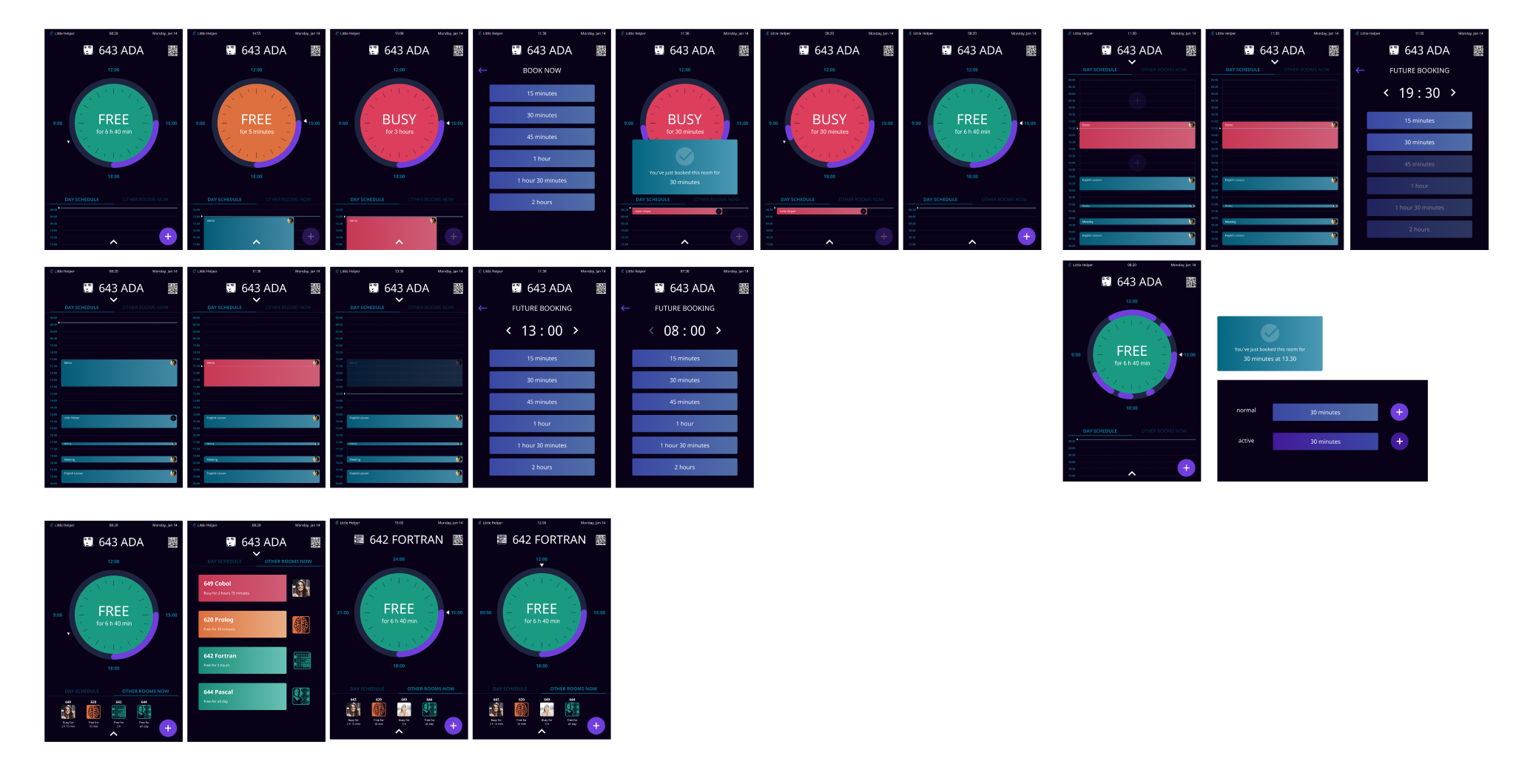
The dial is located on the main screen, it’s color indicates whether the room is free (green), busy (red) or a meeting is soon to be booked (orange, the room is theoretically free, but you can’t book it, because a meeting starts less than in 5 minutes).

Also a person can see on the main screen:

  • How many minutes are left before the start of the next meeting or until the end of the current one
  • Number, name and logo of the room (for example, Ada, because all meeting rooms are named after programming languages)
  • A QR code that can provide interesting facts about the programming language
man walking in front of textured wall

The purple border color of the dial indicates the booked time. The minimum time that can be booked is 15 minutes. When meeting is over the bright purple color becomes faded.


The tablet start running automatically at 8 A.M. and turns off at 8 P.M. so all the time that you can book is optimally suited for the 12-hour dial.

man walking in front of textured wall

How to book a room

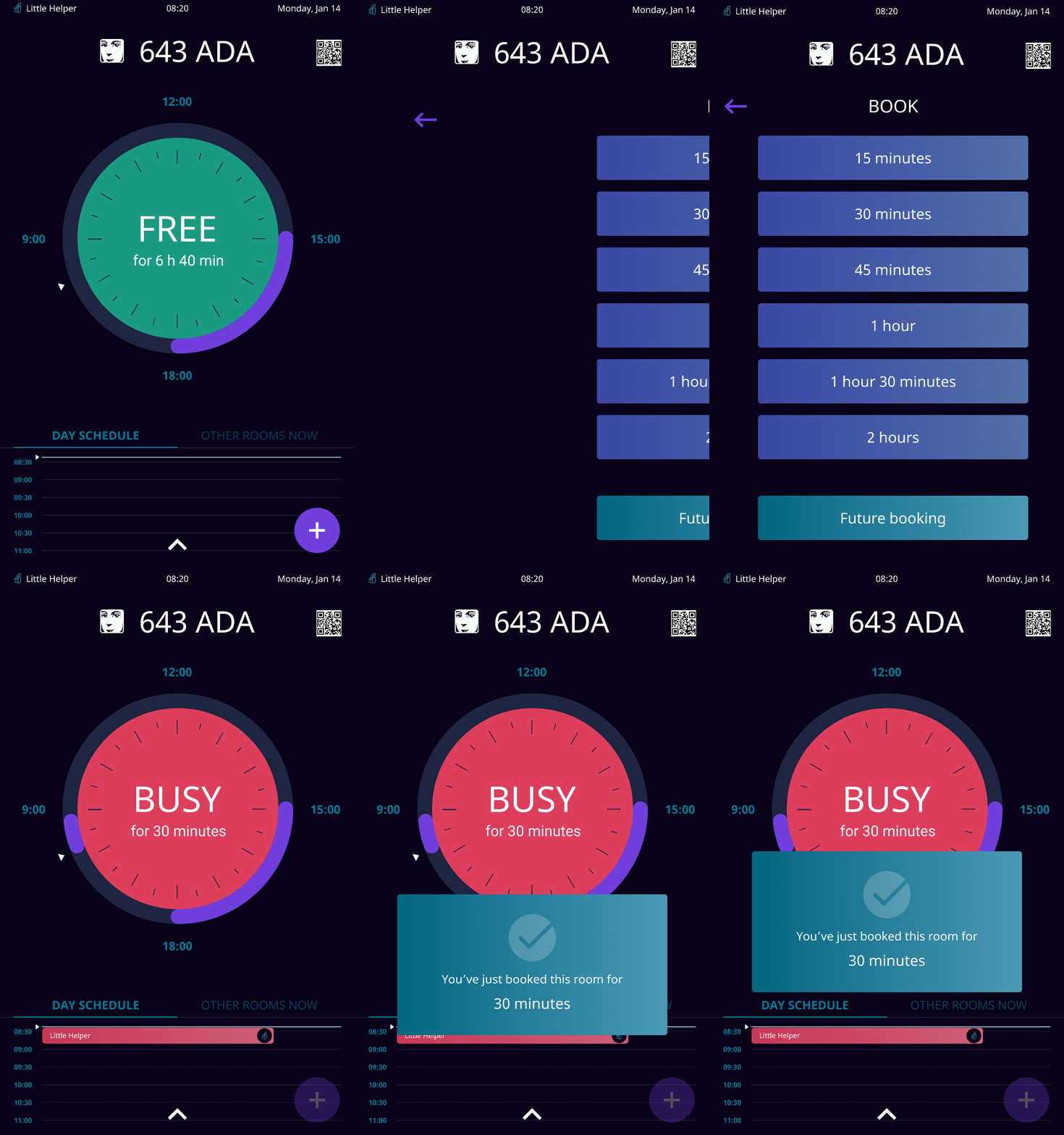
To book a room you need to tap on the plus button in the low right corner. This decision is based on user tests.


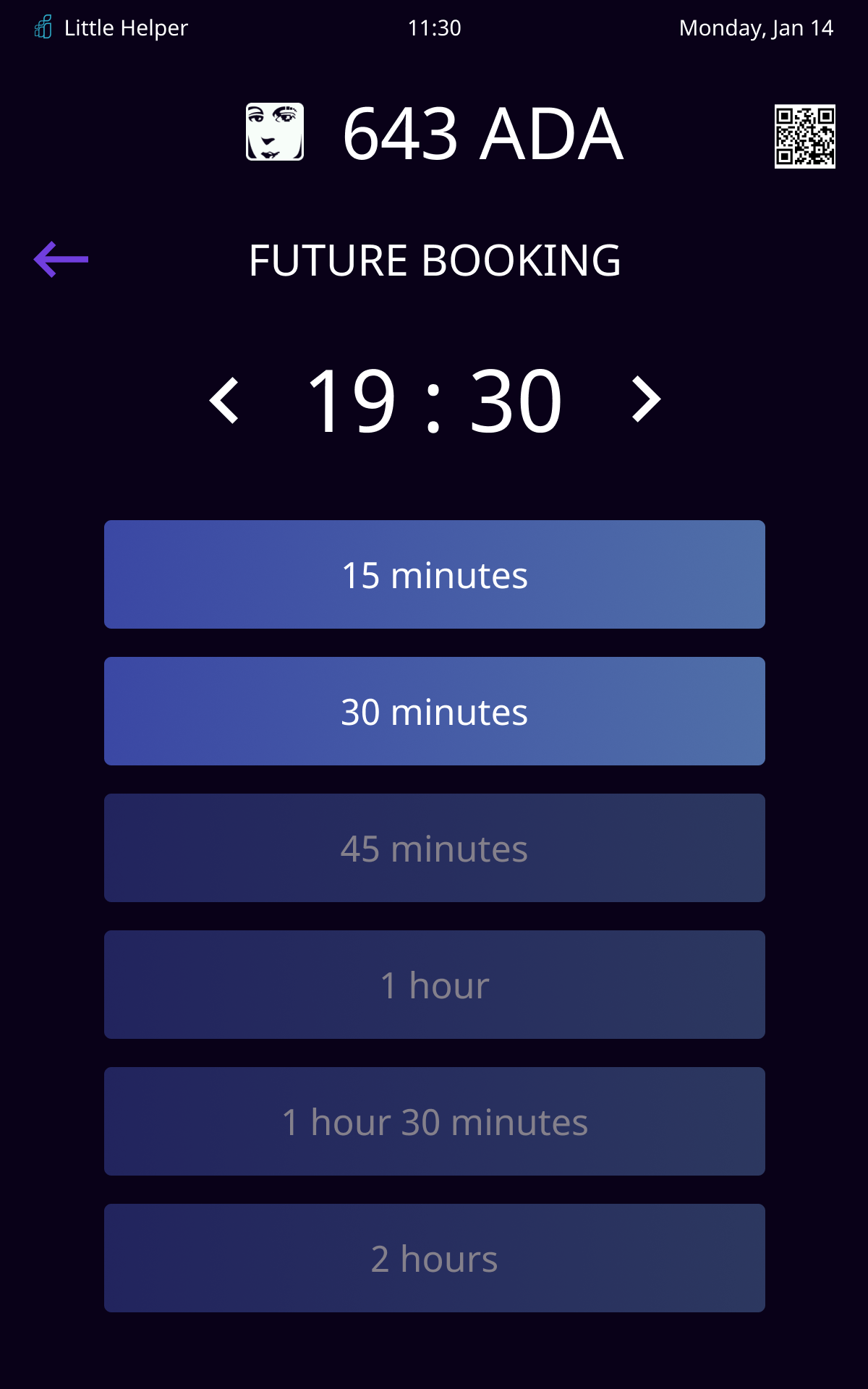
By tapping on this button, a new screen opens where person can choose the duration of the booking or select a specific time in the future. This is not the only way to book. Person can also book from the schedule.

SCHEDULE

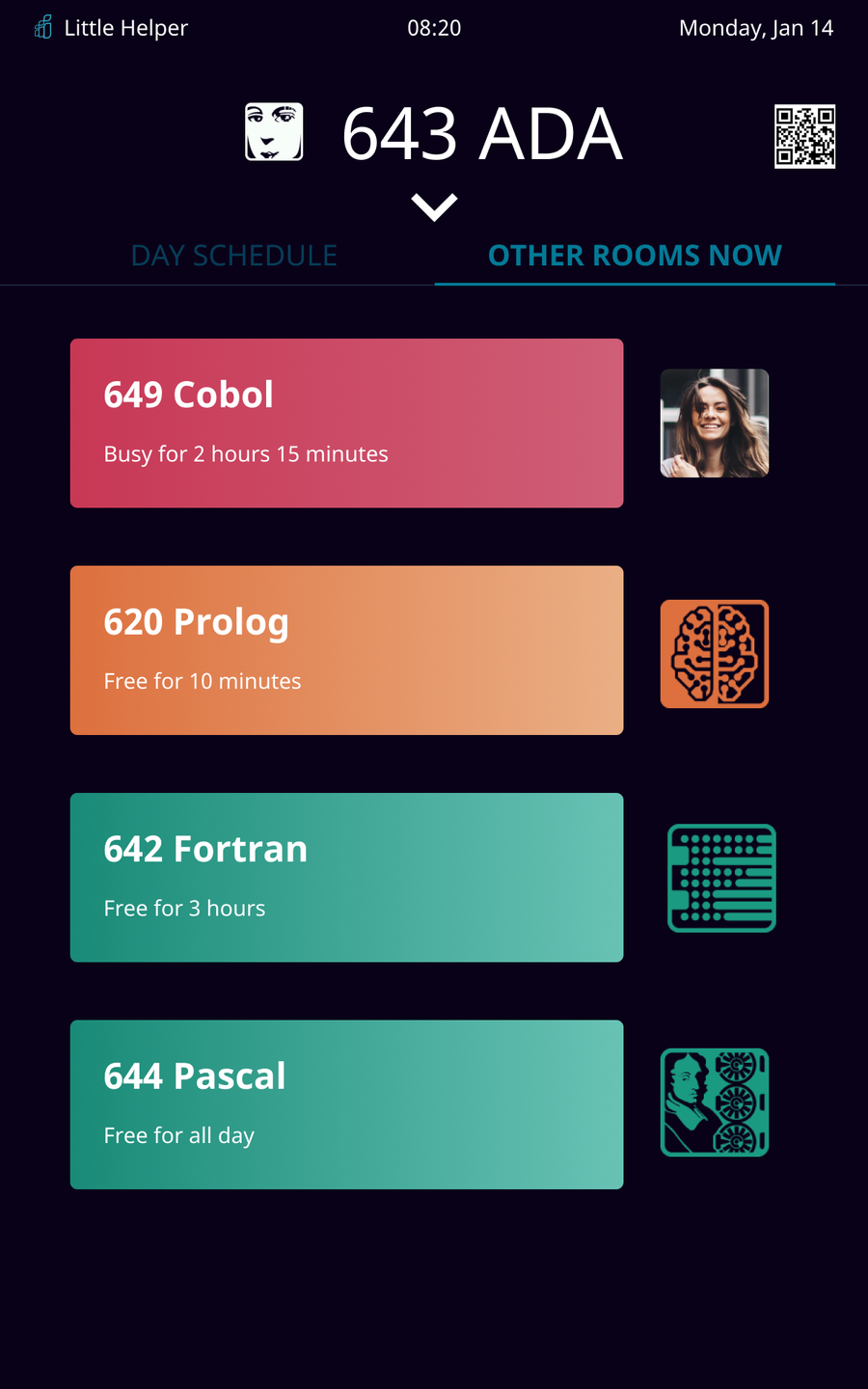
There are two tabs under the dial: day schedule and statuses of other rooms. In the default state we can see only shortened version.


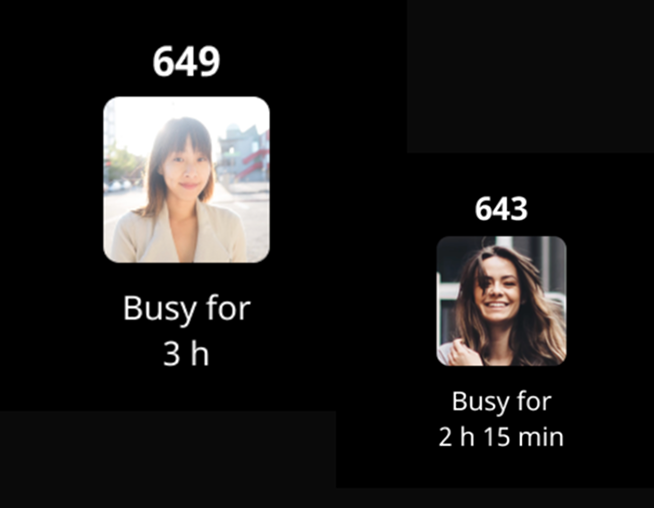
But person can swipe to see the whole schedule for the day or detailed information about other rooms (there are five meeting rooms in total).


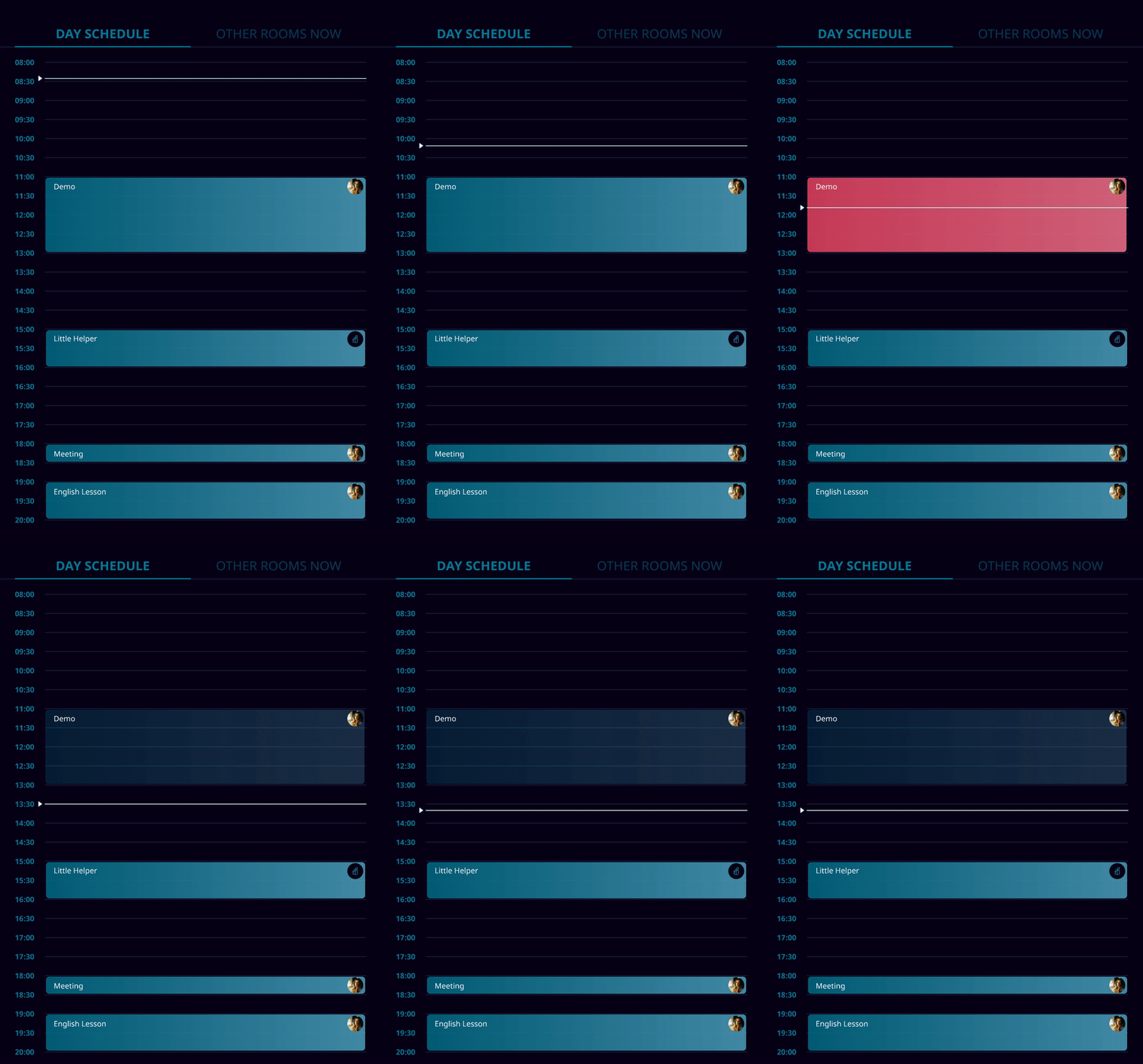
In the schedule we see a list of all room's meetings for this day. Person can tap on free time to book the right time. For convenience exact time can be edited on the next step. The case of booking from the schedule was based on user tests.

man walking in front of textured wall

If the room was booked from a computer we can see a employee's photo.


If it was booked from a tablet then there will be the app logo.

man walking in front of textured wall

Future booking

man walking in front of textured wall

Although the main case is to book the meeting room here and now (that’s why the colour plays the significant role and actual time isn’t so noticeable) person can book the room for the future time through the plus button or through the schedule.


In the second case it's easy to tap in the wrong place, so on the next screen person can edit time. The app shows the available duration of time in case of further bookings.

REFLECTION

Creating an app for my colleagues who will use it on a daily basis was a responsible and enjoyable task. After all I saw the result of our team work every day and could observe user's actions of users in real situations (not during user tests).

Next project

Community platform for collaborative side projects

Side PRJCT

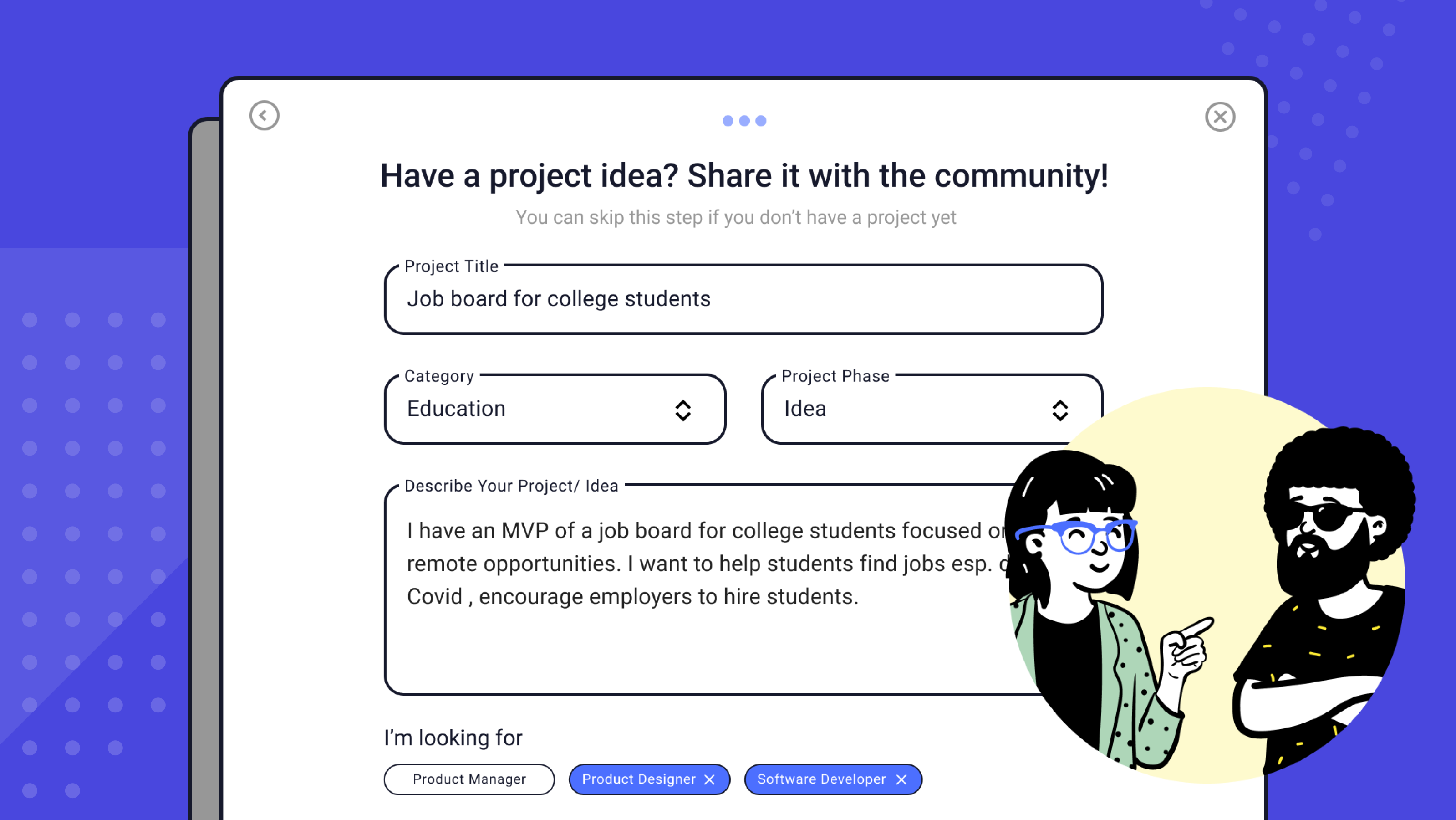
As the first in‑house designer, I established a structured design process, replacing ad‑hoc practices. Delivered a platform rebrand, improved overall UX based on research and metrics, and introduced new features that received highly positive feedback from clients.

Read case study

blurry photo of sunset over ocean with logo on top

Let's keep in touch

elena.1337.mochalova@gmail.com

LinkedIn

Mobile booking app

Little Helper

man walking in front of textured wall

CONTEXT

Little Helper is a mobile booking app for teams and HR managers so that they can quickly book a room without going to their workplaces.

KEY RESULTS

Booking time reduced by

70%

User satisfaction

92%

CHALLENGES& GOALS

  • Create convenient meeting rooms booking app
  • It should be clearly visible if the meeting room is busy or freefrom a few meters
  • Person should be able to see statuses of other meeting rooms from one tablet
  • Person should be able to see the schedule for this day
  • Any booking room should be able to be booked from any tablet

CLIENT

IT company's internal project for more than 400 employees

TEAM

Designer (me), manager and android Engineer

MY ROLE

Interviewing, concept creating, prototyping, interaction and visual design, user-testing

man walking in front of textured wall

DEFININGTHE PROBLEM

The company has offices on several floors. Employee can book a meeting room only from their workspaces or go and check every meeting room.

A lot of managers asked to have the opportunity to book a room when they stay near it, so that they don't need to go to another floor to their room and lose time.

SOLUTION

We created an app for tablets that were hung next to each meeting room, so now employees don’t have to waste time to find out which rooms are free and which ones are busy. First mvp version was created by manager and developer to find technical capabilities and limitations. After that they decided to ask for my help as a designer to find best solutions, work through use cases and visual style.

The application has been implemented and successfully using for more than six month. We got a lot of positive feedback.

APPROACH

Booking a room should be simple and effective case during employee work day, such things shouldn't irritate people or distract business meetings. I realised the importance of creating a streamlined approach for people to not only give people possibility to book a room here and now but also recognise process which I called 'meeting routine'.

How and why do people hold meetings?What pain points do employees experience when trying to book a room?
Product goals

ACCURATE

Timetable for 'today' is reliable, person can see which rooms are booked and which ones are free for certain time

ACCESSIBLE

The booking feature can easily be found and accessed and frictionless to save time

EFFICIENT

The booking process is smooth and frictionless to save time for business tasks and meetings

Long term goals

PRESENTABLE

Application can become our portfolio project in which other customers can be interested in

RESEARCH

I interviewed project and HR managers, because they book rooms more often than any other employee. I asked them about their meeting routine, how offten do they book a meeting room, how long ususally meeting lasts, with whom they they hold meeting, etc. Answers to these questions provided me insights what should and shouldn't be in the app.


When translating the pain-points into ideas I developed a set of prototypes. I started working with color, although shades were approximate and rough, I needed to see how layout would look like with green and red and determine the amount of color on the screen.

man walking in front of textured wall

I presented to the team results of the interview and my ideas with these sketches how we can solve problems and achieve our goals. Collaborating with developer and manager we diverged to possible features and then came together to determine the necessary ones.

MOODBOARD

After finalazing user experience workflow I started working on visual design. We decided to develop the app in dark colors and futuristic style.

man walking in front of textured wall

USER TESTING

I prepared an interactive prototype and we asked our group of respondents to book a room here and now, to book for the future time, to view the room's schedule for today and what other rooms are available. We were able to test the team’s hypotheses and make a final decision that would suit everyone.

man walking in front of textured wall

Final outcome

MAIN SCREEN

The dial is located on the main screen, it’s color indicates whether the room is free (green), busy (red) or a meeting is soon to be booked (orange, the room is theoretically free, but you can’t book it, because a meeting starts less than in 5 minutes).

Also a person can see on the main screen:

  • How many minutes are left before the start of the next meeting or until the end of the current one
  • Number, name and logo of the room (for example, Ada, because all meeting rooms are named after programming languages)
  • A QR code that can provide interesting facts about the programming language
man walking in front of textured wall

The purple border color of the dial indicates the booked time. The minimum time that can be booked is 15 minutes. When meeting is over the bright purple color becomes faded.


The tablet start running automatically at 8 A.M. and turns off at 8 P.M. so all the time that you can book is optimally suited for the 12-hour dial.

man walking in front of textured wall

How to book a room

To book a room you need to tap on the plus button in the low right corner. This decision is based on user tests.


By tapping on this button, a new screen opens where person can choose the duration of the booking or select a specific time in the future. This is not the only way to book. Person can also book from the schedule.

SCHEDULE

There are two tabs under the dial: day schedule and statuses of other rooms. In the default state we can see only shortened version.


But person can swipe to see the whole schedule for the day or detailed information about other rooms (there are five meeting rooms in total).


In the schedule we see a list of all room's meetings for this day. Person can tap on free time to book the right time. For convenience exact time can be edited on the next step. The case of booking from the schedule was based on user tests.

man walking in front of textured wall

If the room was booked from a computer we can see a employee's photo.


If it was booked from a tablet then there will be the app logo.

man walking in front of textured wall

Future booking

Although the main case is to book the meeting room here and now (that’s why the colour plays the significant role and actual time isn’t so noticeable) person can book the room for the future time through the plus button or through the schedule.


In the second case it's easy to tap in the wrong place, so on the next screen person can edit time. The app shows the available duration of time in case of further bookings.

man walking in front of textured wall

REFLECTION

Creating an app for my colleagues who will use it on a daily basis was a responsible and enjoyable task. After all I saw the result of our team work every day and could observe user's actions of users in real situations (not during user tests).

Next project

Community platform for collaborative side projects

Side PRJCT

As the first in‑house designer, I established a structured design process, replacing ad‑hoc practices. Delivereda platform rebrand, improved overall UX based on research and metrics, and introduced new features that received highly positive feedback from clients.

Read case study

blurry photo of sunset over ocean with logo on top

Let's keep in touch

elena.1337.mochalova@gmail.com

LinkedIn

Mobile booking app

Little Helper

man walking in front of textured wall

CONTEXT

Little Helper is a mobile booking app for teams and HR managers so that they can quickly book a room without going to their workplaces.

KEY RESULTS

Booking time reduced by

70%

User satisfaction

92%

CHALLENGES & GOALS

  • Create convenient meeting rooms booking app
  • It should be clearly visible if the meeting room is busy or freefrom a few meters
  • Person should be able to see statuses of other meeting rooms from one tablet
  • Person should be able to see the schedule for this day
  • Any booking room should be able to be booked from any tablet

CLIENT

IT company's internal project for more than 400 employees

TEAM

Designer (me), manager and android Engineer

MY ROLE

Interviewing, concept creating, prototyping, interaction and visual design, user-testing

man walking in front of textured wall

DEFININGTHE PROBLEM

The company has offices on several floors. Employee can book a meeting room only from their workspaces or go and check every meeting room.

A lot of managers asked to have the opportunity to book a room when they stay near it, so that they don't need to go to another floor to their room and lose time.

SOLUTION

We created an app for tablets that were hung next to each meeting room, so now employees don’t have to waste time to find out which rooms are free and which ones are busy. First mvp version was created by manager and developer to find technical capabilities and limitations. After that they decided to ask for my help as a designer to find best solutions, work through use cases and visual style.

The application has been implemented and successfully using for more than six month. We got a lot of positive feedback.

APPROACH

Booking a room should be simple and effective case during employee work day, such things shouldn't irritate people or distract business meetings. I realised the importance of creating a streamlined approach for people to not only give people possibility to book a room here and now but also recognise process which I called 'meeting routine'.

How and why do people hold meetings?What pain points do employees experience when trying to book a room?
Product goals

ACCURATE

Timetable for 'today' is reliable, person can see which rooms are booked and which ones are free for certain time

ACCESSIBLE

The booking feature can easily be found and accessed and frictionless to save time

EFFICIENT

The booking process is smooth and frictionless to save time for business tasks and meetings

Long term goals

PRESENTABLE

Application can become our portfolio project in which other customers can be interested in

RESEARCH

I interviewed project and HR managers, because they book rooms more often than any other employee. I asked them about their meeting routine, how offten do they book a meeting room, how long ususally meeting lasts, with whom they they hold meeting, etc. Answers to these questions provided me insights what should and shouldn't be in the app.


When translating the pain-points into ideas I developed a set of prototypes. I started working with color, although shades were approximate and rough, I needed to see how layout would look like with green and red and determine the amount of color on the screen.

man walking in front of textured wall

I presented to the team results of the interview and my ideas with these sketches how we can solve problems and achieve our goals. Collaborating with developer and manager we diverged to possible features and then came together to determine the necessary ones.

MOODBOARD

After finalazing user experience workflow I started working on visual design. We decided to develop the app in dark colors and futuristic style.

man walking in front of textured wall

USER TESTING

I prepared an interactive prototype and we asked our group of respondents to book a room here and now, to book for the future time, to view the room's schedule for today and what other rooms are available. We were able to test the team’s hypotheses and make a final decision that would suit everyone.

man walking in front of textured wall

Final outcome

man walking in front of textured wall

MAIN SCREEN

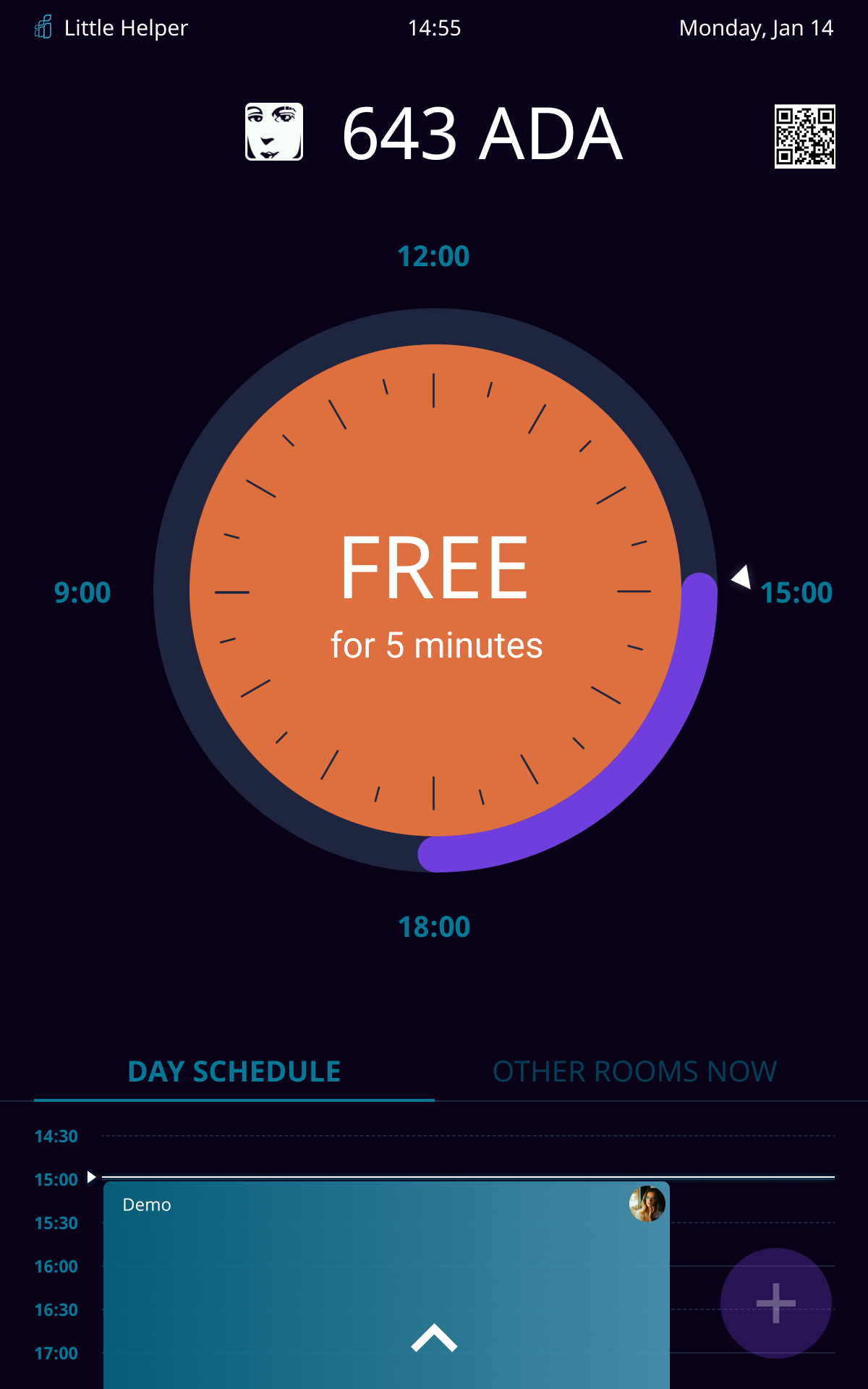
The dial is located on the main screen, it’s color indicates whether the room is free (green), busy (red) or a meeting is soon to be booked (orange, the room is theoretically free, but you can’t book it, because a meeting starts less than in 5 minutes).

Also a person can see on the main screen:

  • How many minutes are left before the start of the next meeting or until the end of the current one
  • Number, name and logo of the room (for example, Ada, because all meeting rooms are named after programming languages)
  • A QR code that can provide interesting facts about the programming language

The purple border color of the dial indicates the booked time. The minimum time that can be booked is 15 minutes. When meeting is over the bright purple color becomes faded.


The tablet start running automatically at 8 A.M. and turns off at 8 P.M. so all the time that you can book is optimally suited for the 12-hour dial.

man walking in front of textured wall

How to book a room

To book a room you need to tap on the plus button in the low right corner. This decision is based on user tests.


By tapping on this button, a new screen opens where person can choose the duration of the booking or select a specific time in the future. This is not the only way to book. Person can also book from the schedule.

man walking in front of textured wall

SCHEDULE

There are two tabs under the dial: day schedule and statuses of other rooms. In the default state we can see only shortened version.


But person can swipe to see the whole schedule for the day or detailed information about other rooms (there are five meeting rooms in total).


In the schedule we see a list of all room's meetings for this day. Person can tap on free time to book the right time. For convenience exact time can be edited on the next step. The case of booking from the schedule was based on user tests.

If the room was booked from a computer we can see a employee's photo.


If it was booked from a tablet then there will be the app logo.

man walking in front of textured wall

Future booking

man walking in front of textured wall

Although the main case is to book the meeting room here and now (that’s why the colour plays the significant role and actual time isn’t so noticeable) person can book the room for the future time through the plus button or through the schedule.


In the second case it's easy to tap in the wrong place, so on the next screen person can edit time. The app shows the available duration of time in case of further bookings.

REFLECTION

Creating an app for my colleagues who will use it on a daily basis was a responsible and enjoyable task. After all I saw the result of our team work every day and could observe user's actions of users in real situations (not during user tests).

Next project

Community platform for collaborative side projects

Side PRJCT

Joined as designer to create UX updates and designs for SIDE PRJCT, a community accelerator where participants build side projects to gain experience in product management, development, and design.

Read case study

blurry photo of sunset over ocean with logo on top

Let's keep in touch

elena.1337.mochalova@gmail.com

LinkedIn