Mobile app for document management for the US market

Smart Storage

man walking in front of textured wall

CONTEXT

Smart Storage allows you to create single or multipage documents and organise them in folders. You can easily share these high-quality documents and also perform optical character recognition.

KEY RESULTS

iOS App Store rating

from 3.8 to 4.5 stars

CHALLENGES & GOALS

  • Investigate, analyze and solve UX problems
  • Update UI and redraw icons

CLIENT

American multinational financial services corporation, one of the largest asset managers in the world

TEAM

Designer (me) and iOS Engineer

MY ROLE

Researching, prototyping, user-testing, UX and UI design

My task was to redesign user interface with only focus on visual design. But I decided to figure out some user experience problems. Smart Storage is a popular app between real estate agents of one US financial corporation, but it can be used not only amongst them.

RESEARCH

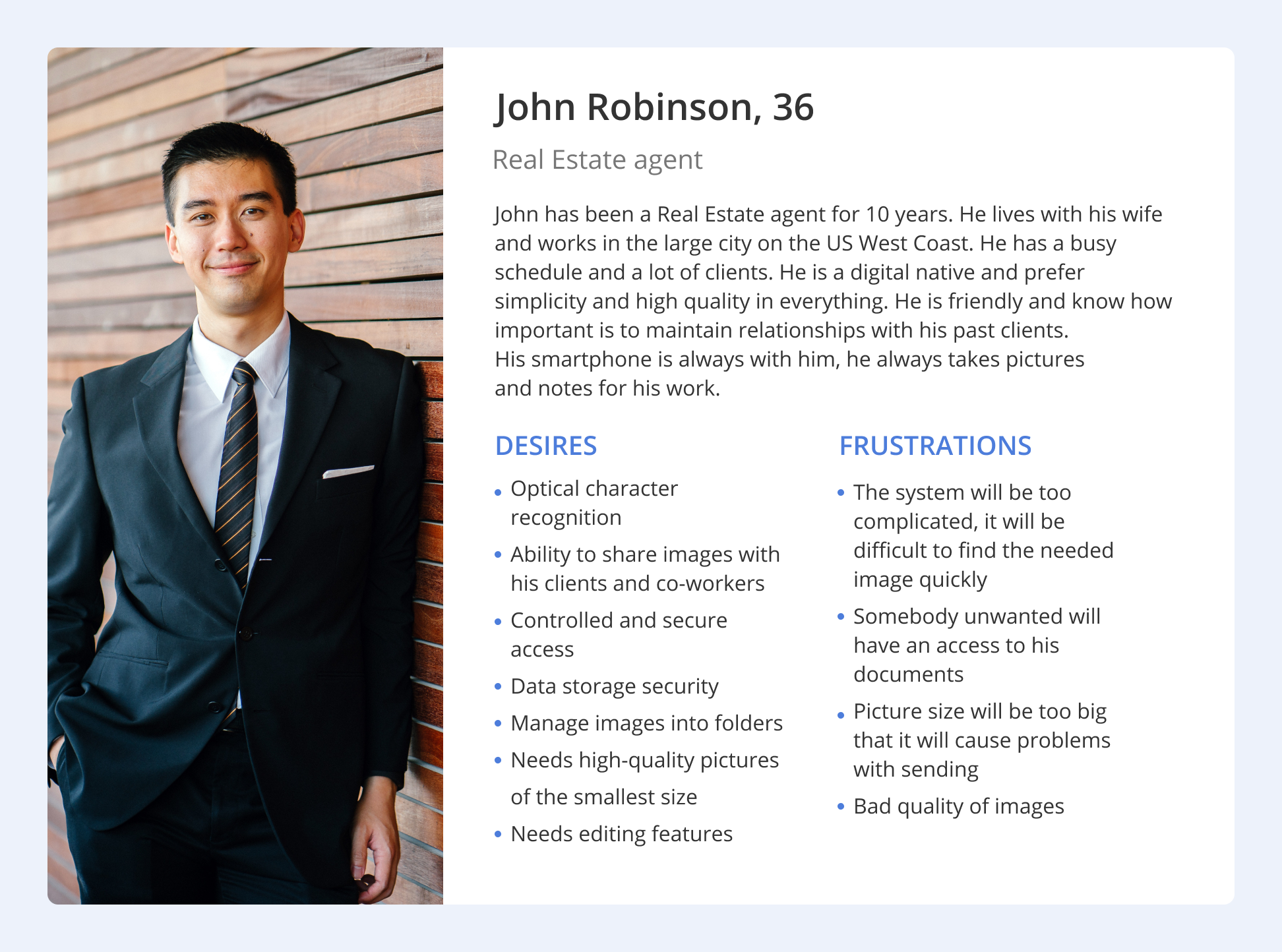
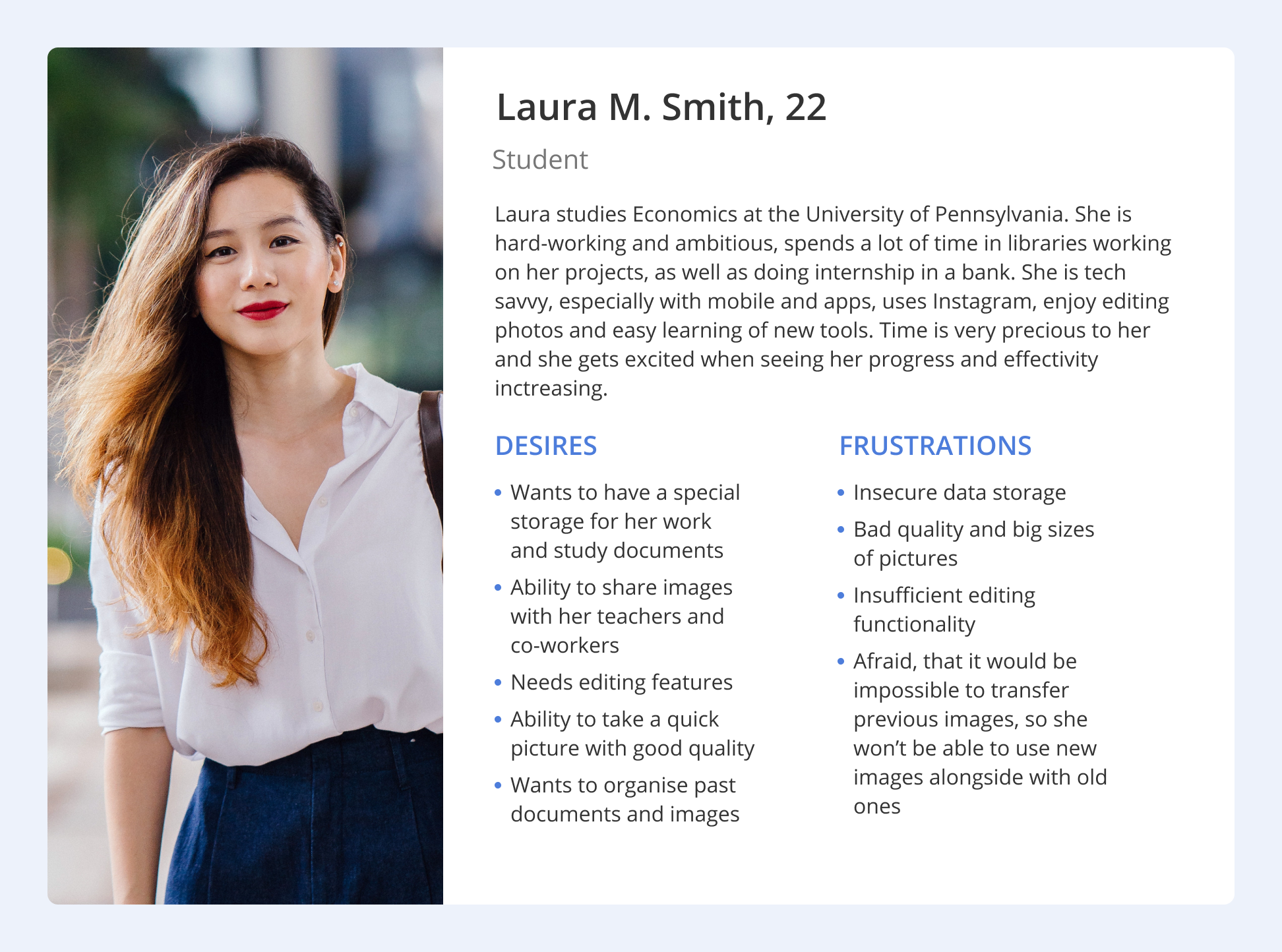
I wanted to dive fresh into the problem by getting to know what people using this app thought in order to understand the bigger picture. After interviewing, I lead the assembly and my findings into Personas to visualise the picture to focus on specific questions current and future users needs.
man walking in front of textured wall

DEFINING THE PROBLEM

How might we reimagine a system for creating, editing, delivery and storage documents and images that can help real estate agents (main number of users), increase number of finance students users and interest teachers and school administration workers (potential users)?

Product goals

ACCESSIBLE

The feature can easily be found and accessed.

EFFICIENT

The process is smooth and frictionless to save time.

Long term goals

FOCUSED TASKS

With their worries diminished, users can now focus on more important tasks.

COLLABORATIVE ENVIRONMENT

The app offers better document sharing and more consistent information delivery, helping users save time.

Due to pain points like complicated editing workflows, inconsistent user experiences, Android-inspired elements in the iOS app, and mismatched icons, the need for a redesign became clear. Beyond updating the visual style I re-evaluated the underlying processes and their cause-effect logic.

IDEATION

With these goals in mind, we brainstormed a map of features along with a feature list in order to understand how the system could work in a broader lens while considering the three target audiences. We have established what current functionality can remain as it is, what can be fixed, and what new features to add.

man walking in front of textured wall

I was responsible with redesigning all screens for the app, considering the last iOS guidelines and technical limitations. I developed new visual style and added new features.

WIREFRAMING

We decided to design wireframes and mockups for Iphone 8, because according to our statistics this is the most popular resolution among users of the app, after customer approval we made versions for other resolutions.

man walking in front of textured wall

PROGRESS

From wireframes to detailed mockups.

man walking in front of textured wall

USER TESTING

We got an opportunity to grab feedback by organising real-life scenarios and tasks for our focus group of 6 people to find out do they understand the process of document editing and icon meanings. They spoke aloud their thoughts while using the app. We received very constructive feedback which helped us to redraw some icons and screens and direct our product to the next step.

MAIN FINDINGS

  • The flow could be more efficient with evaluating the number of touch-points and time spent
  • Guidelines are important, because users have specific habits and expectations from the app

Final outcome

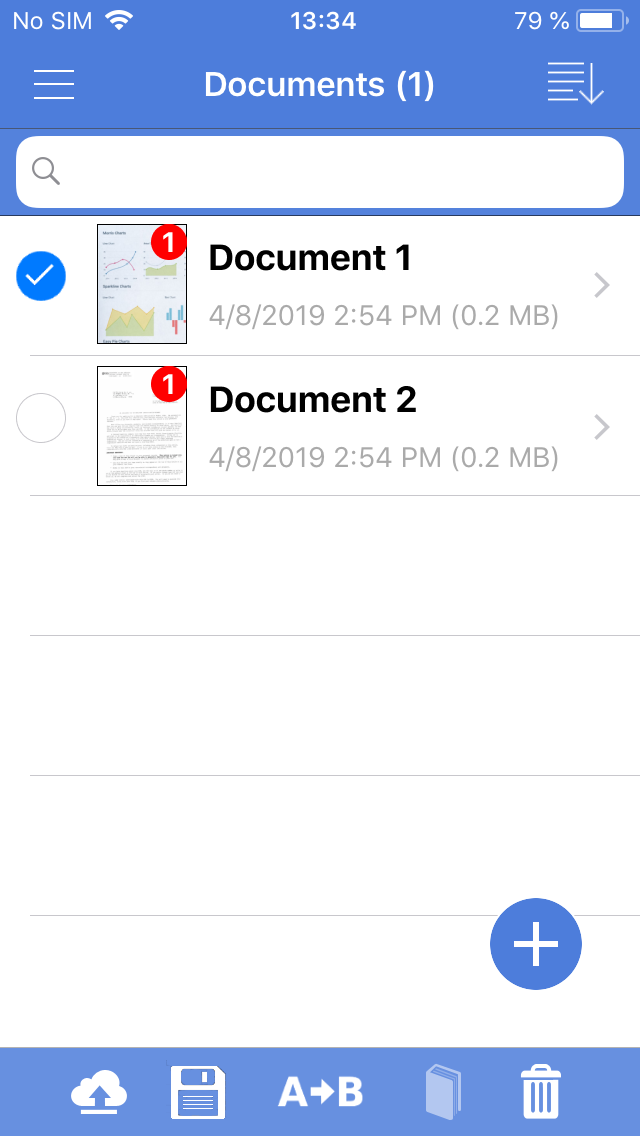
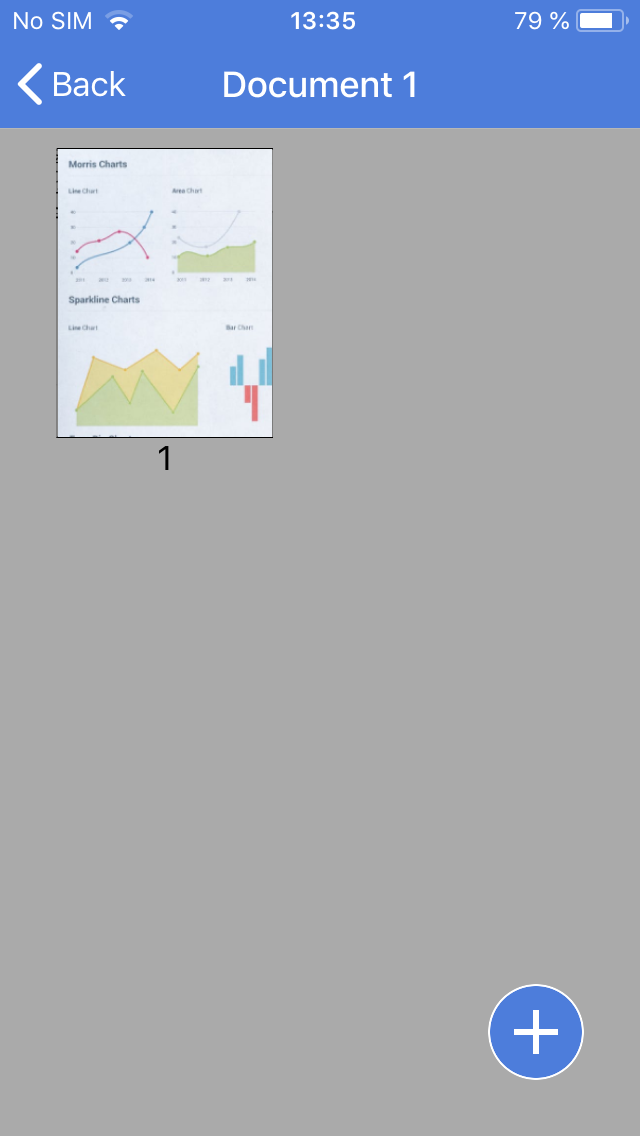
DOCUMENTS

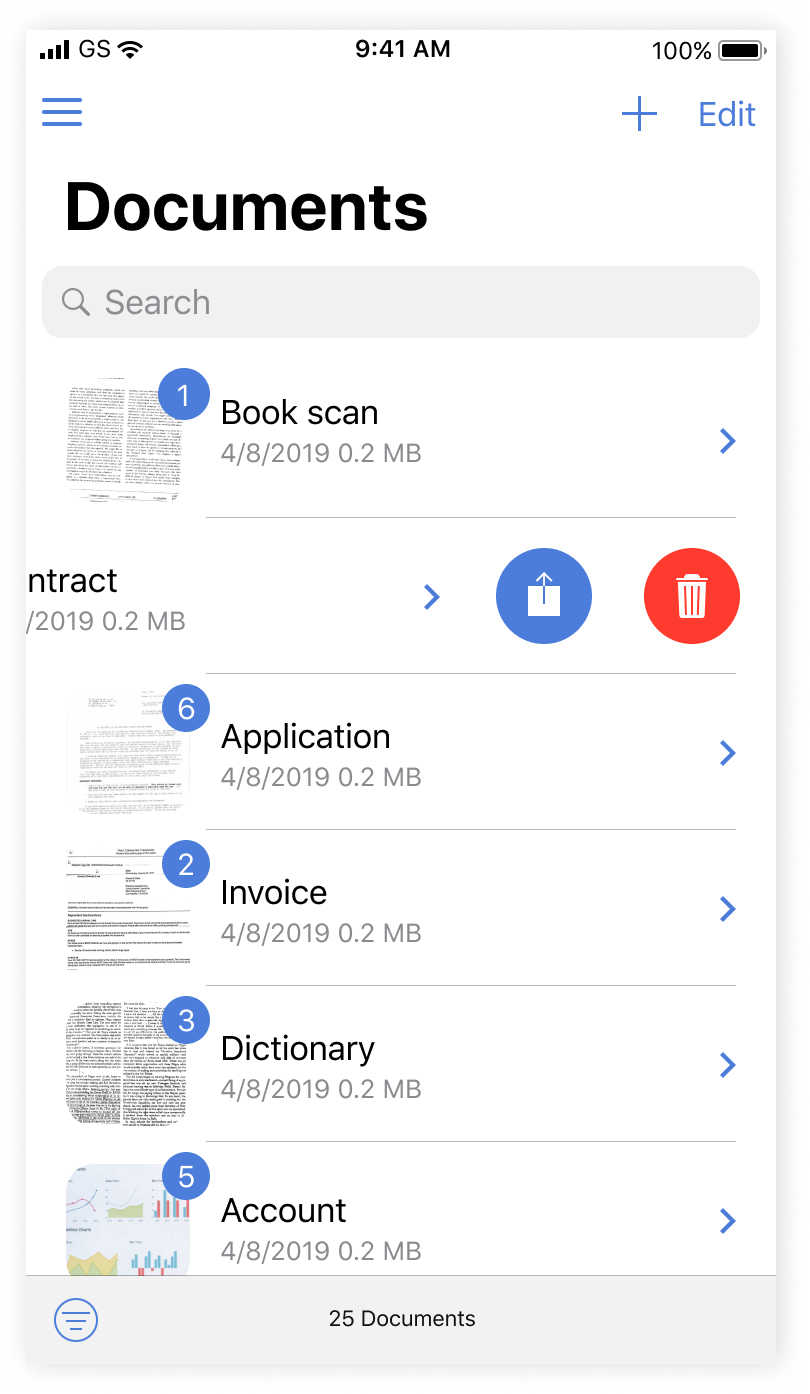
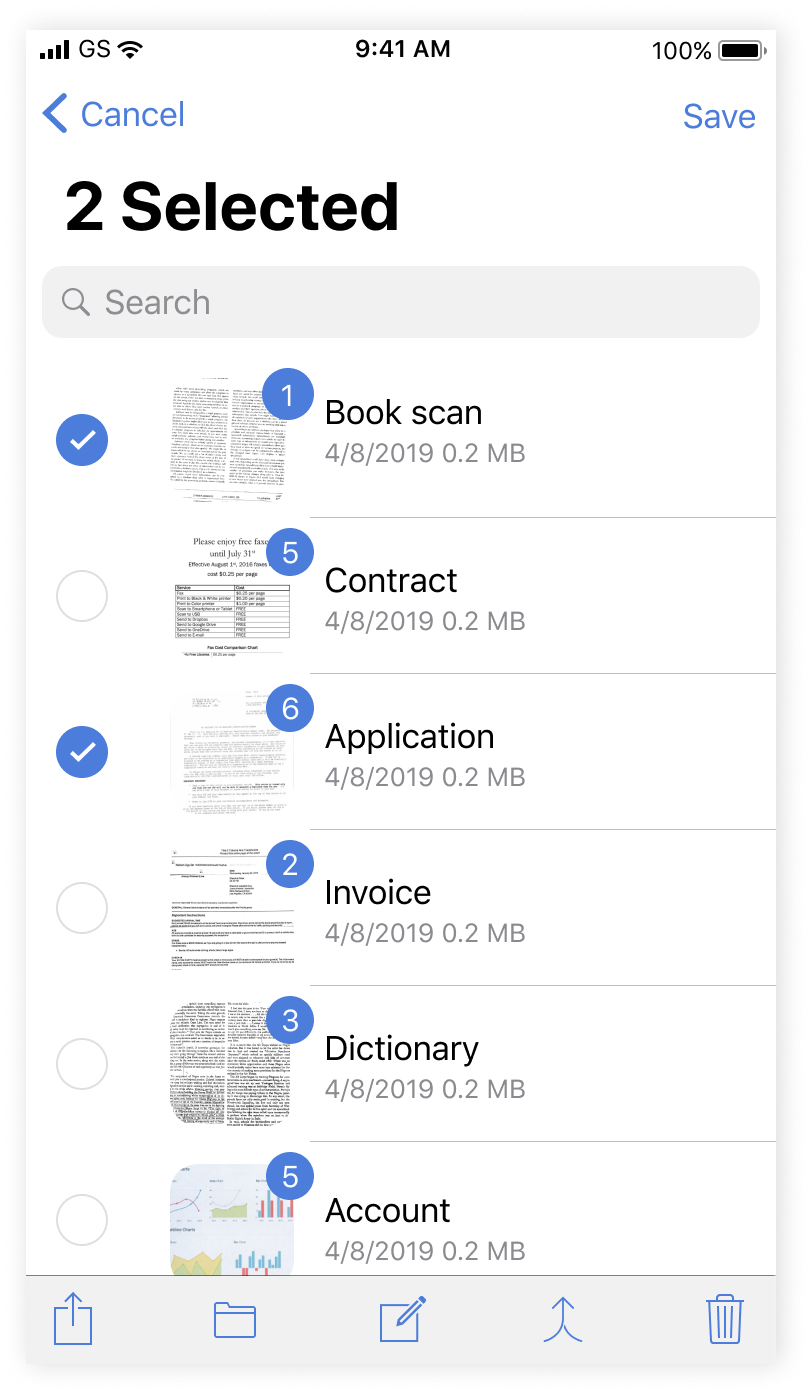
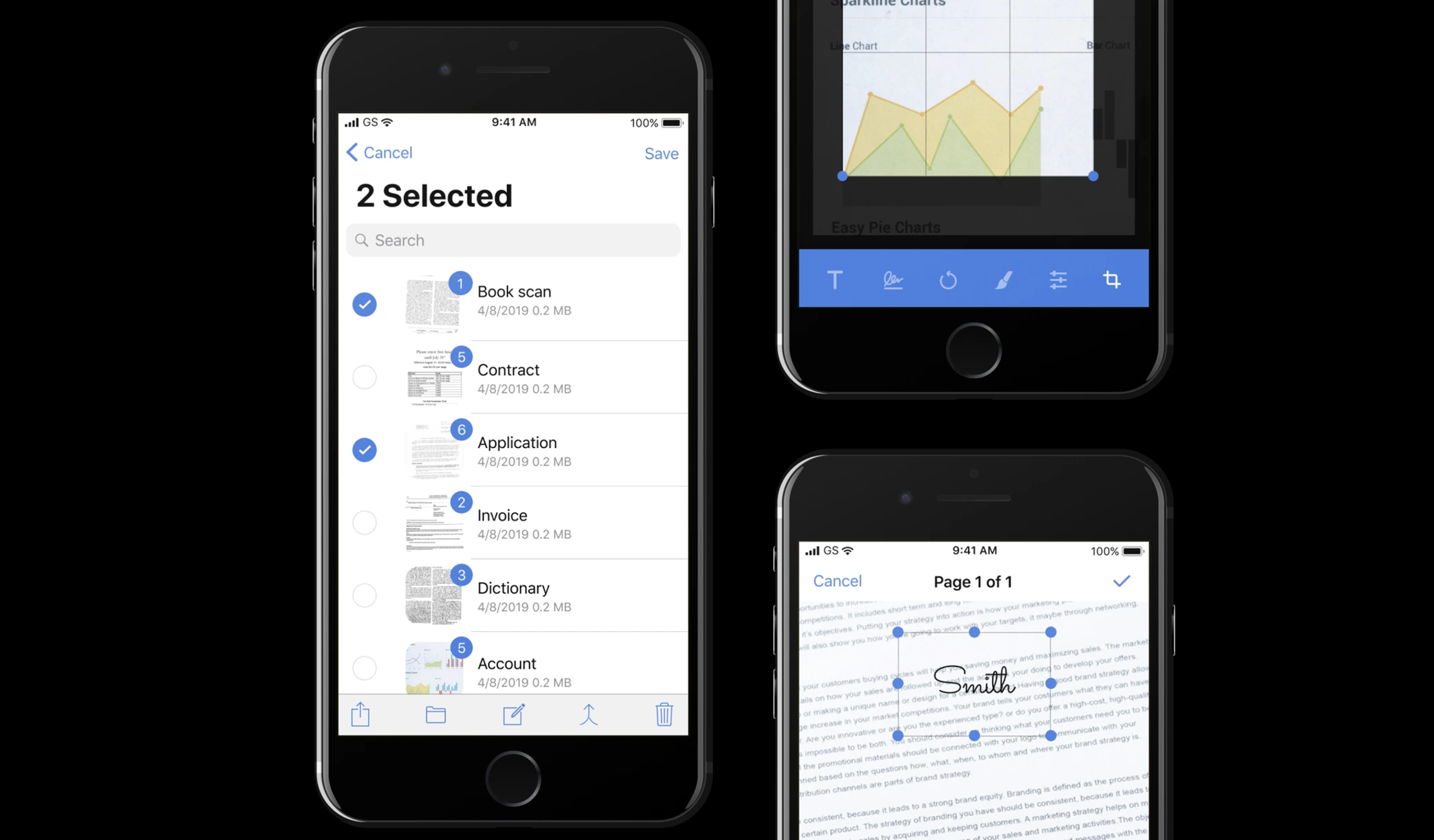
Person can view all documents, counter means the number of pages in this documents.


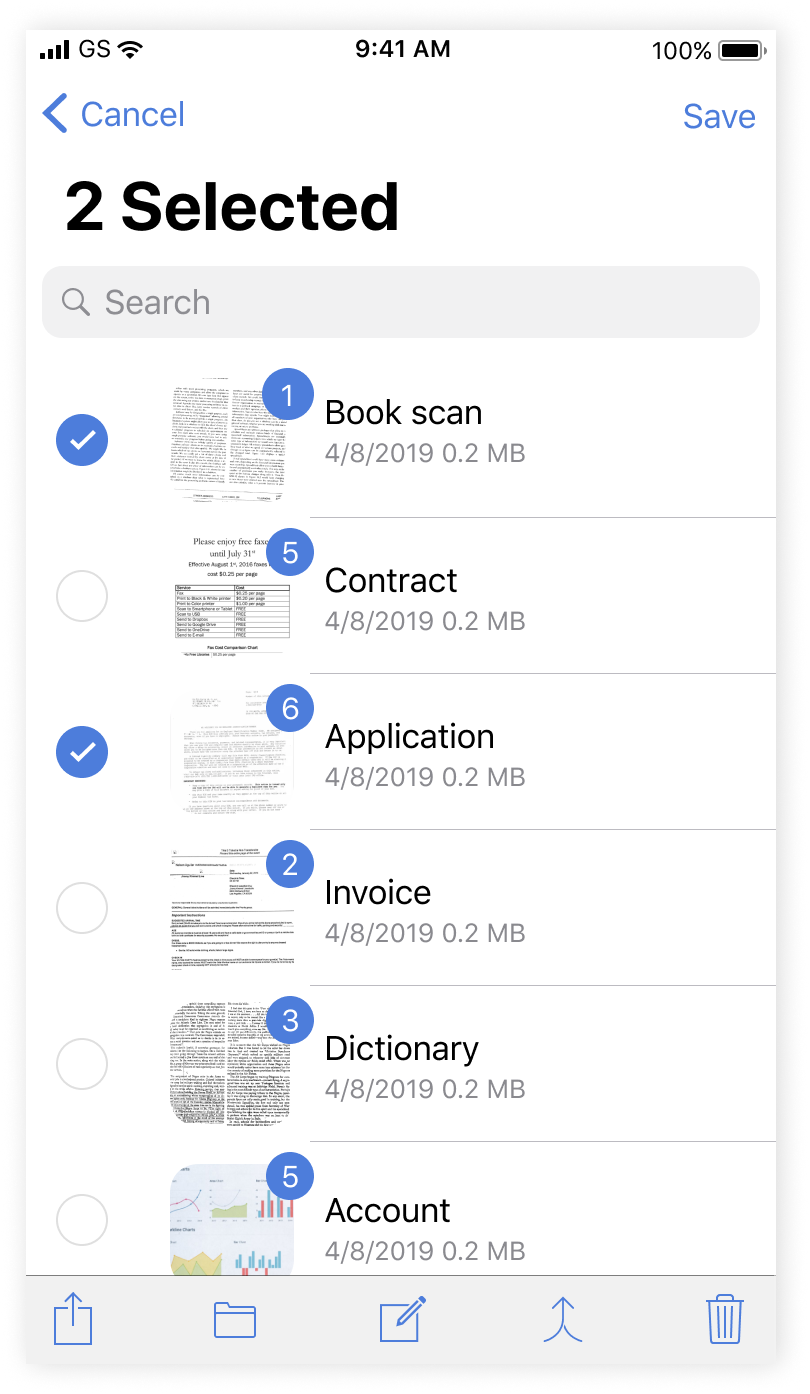
By long tap user can select a few documents and edit them using the bottom menu.

man walking in front of textured wall

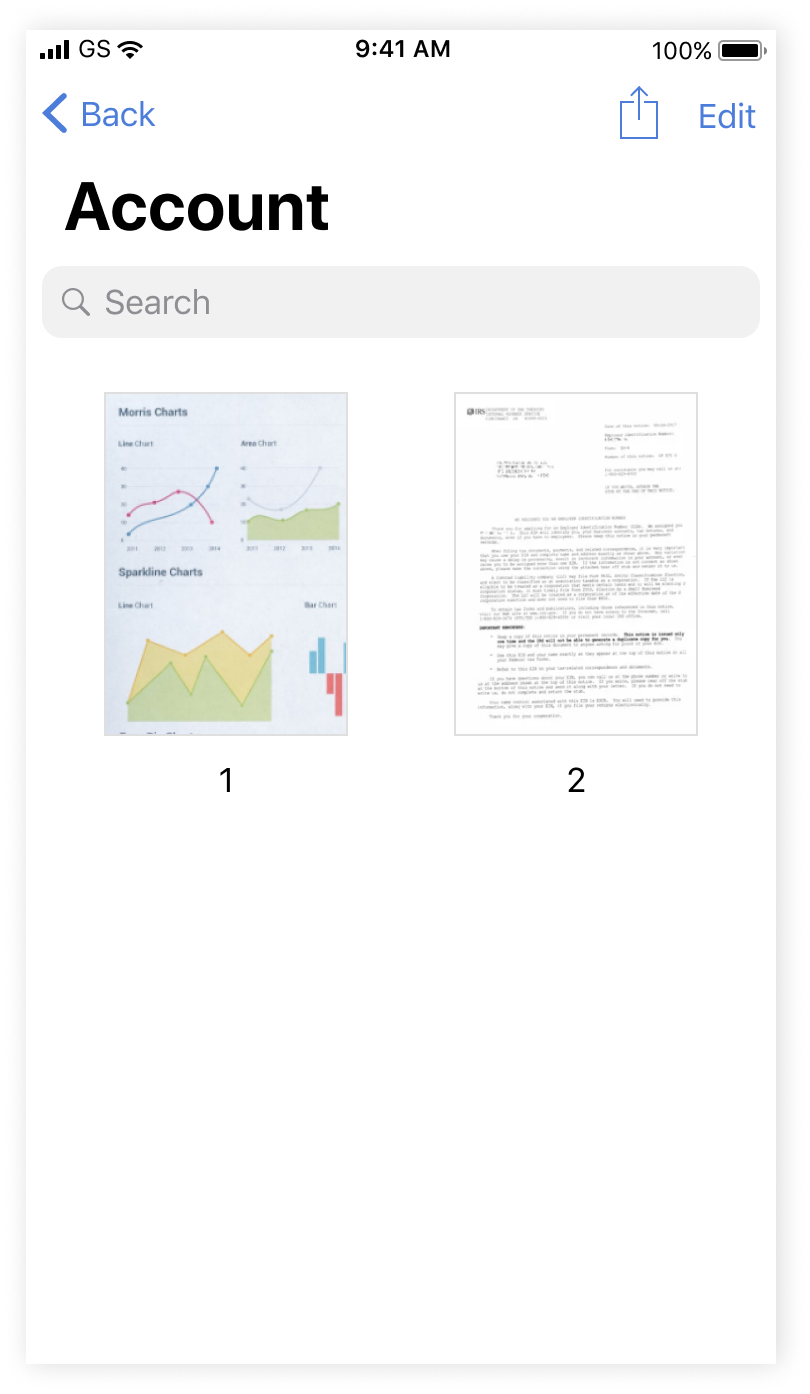
Document can be sent in several ways, person can see 'send' icon by swiping or long tapping on the Documents view or from the page of the document itself.

man walking in front of textured wall

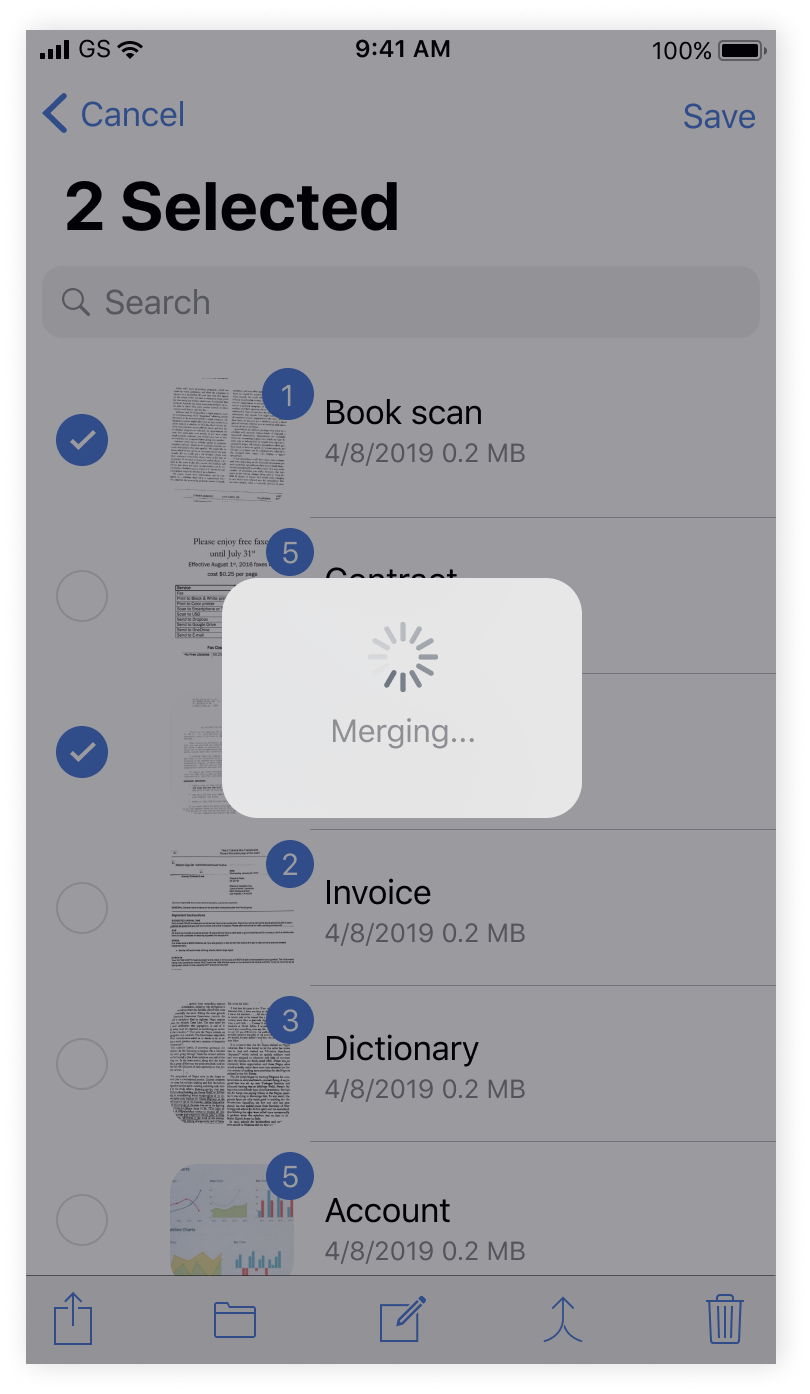
MERGING

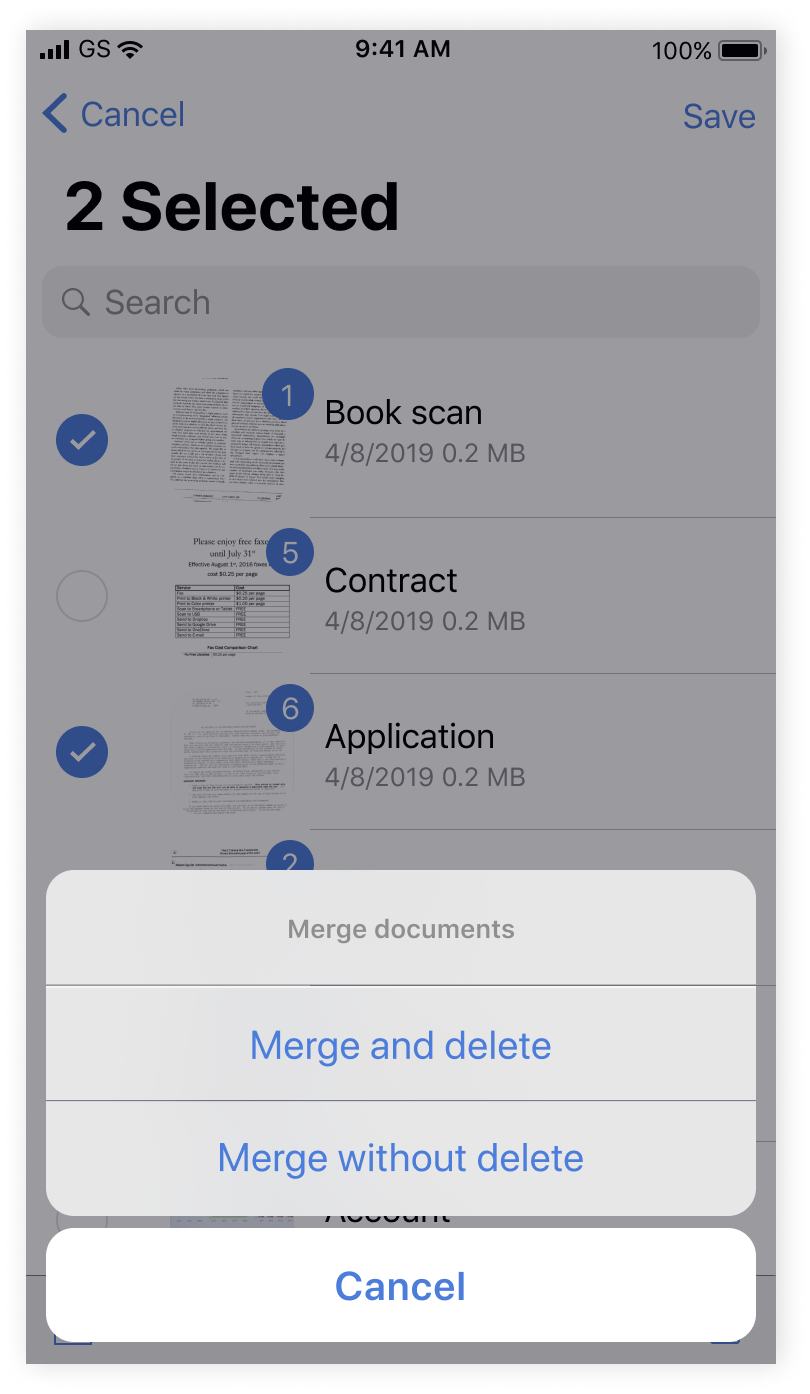
Icon in the bottom menu was chenged, added option to choose delete or keep documents after merging, spinner was also added.

man walking in front of textured wall

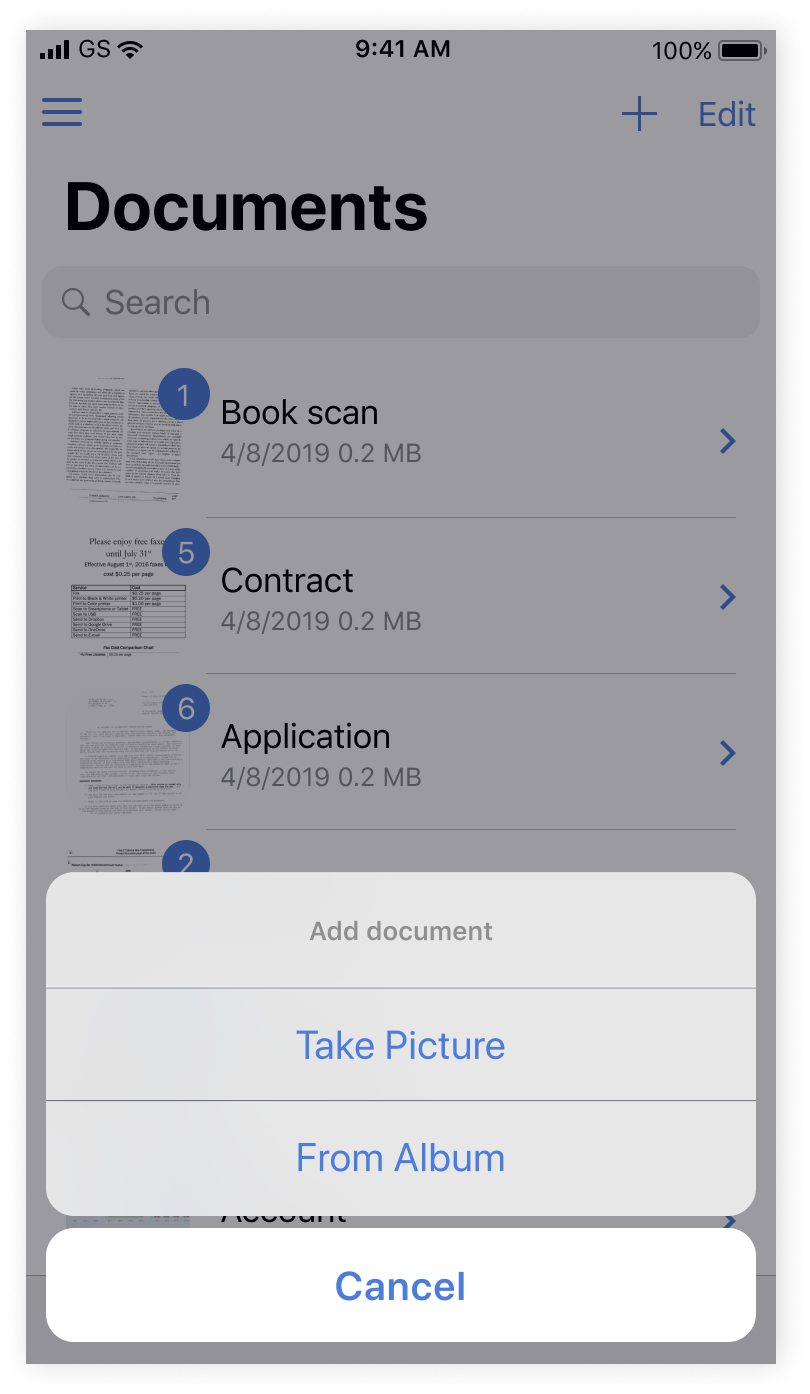
UPLOAD IMAGE

Now person can upload documents from mobile storage to the app.

man walking in front of textured wall

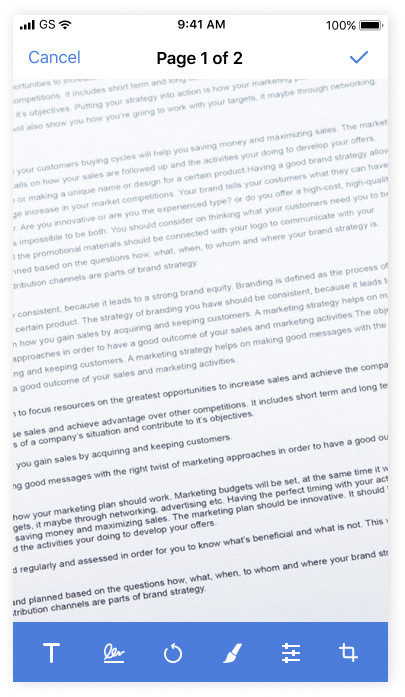
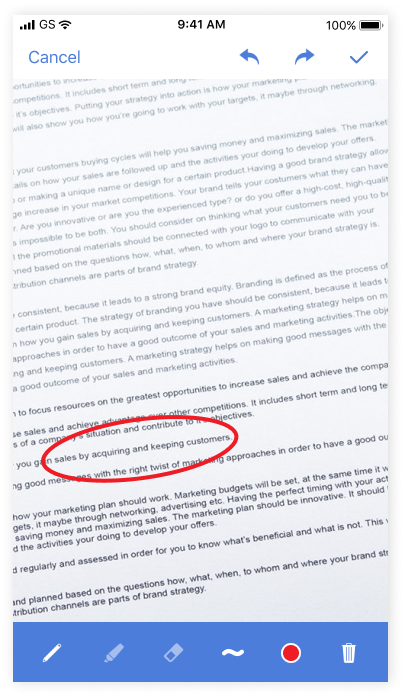
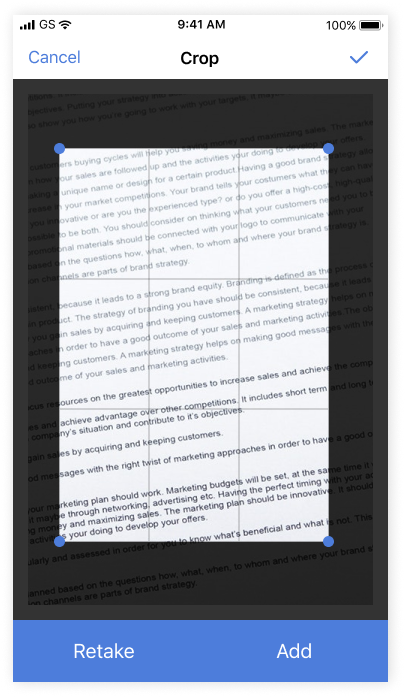
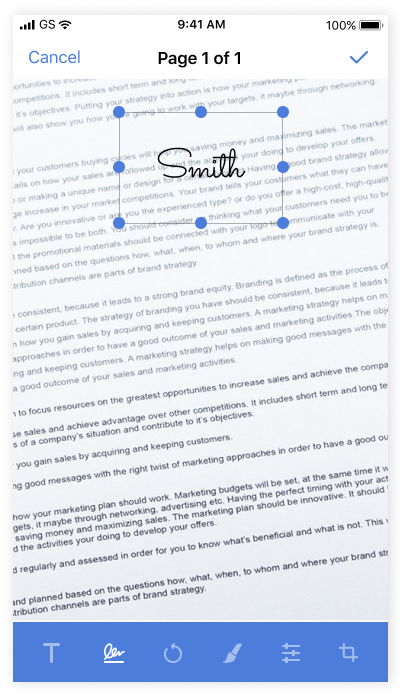
EDIT DOCUMENT

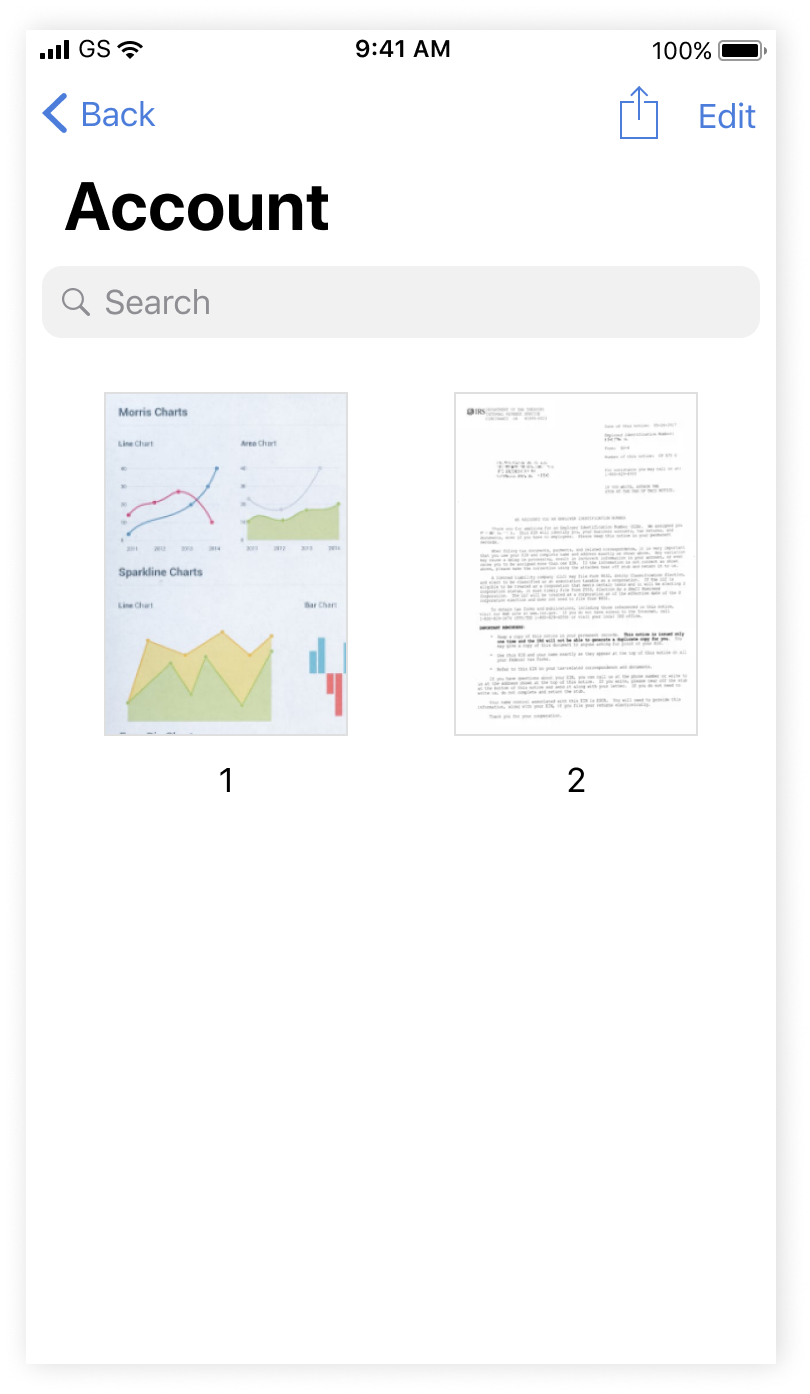
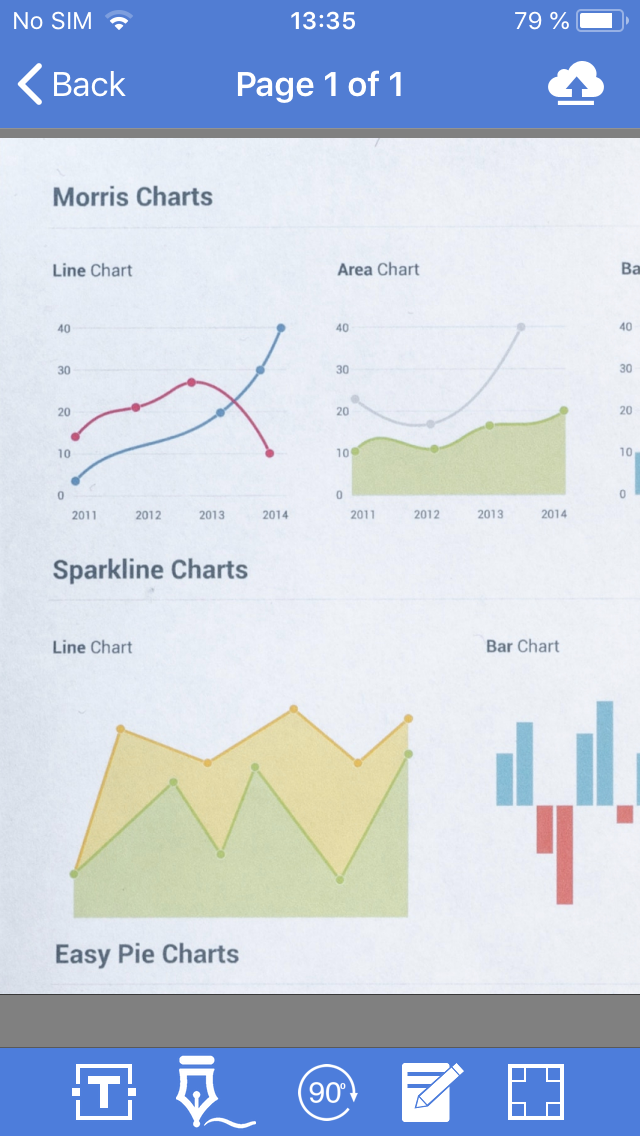
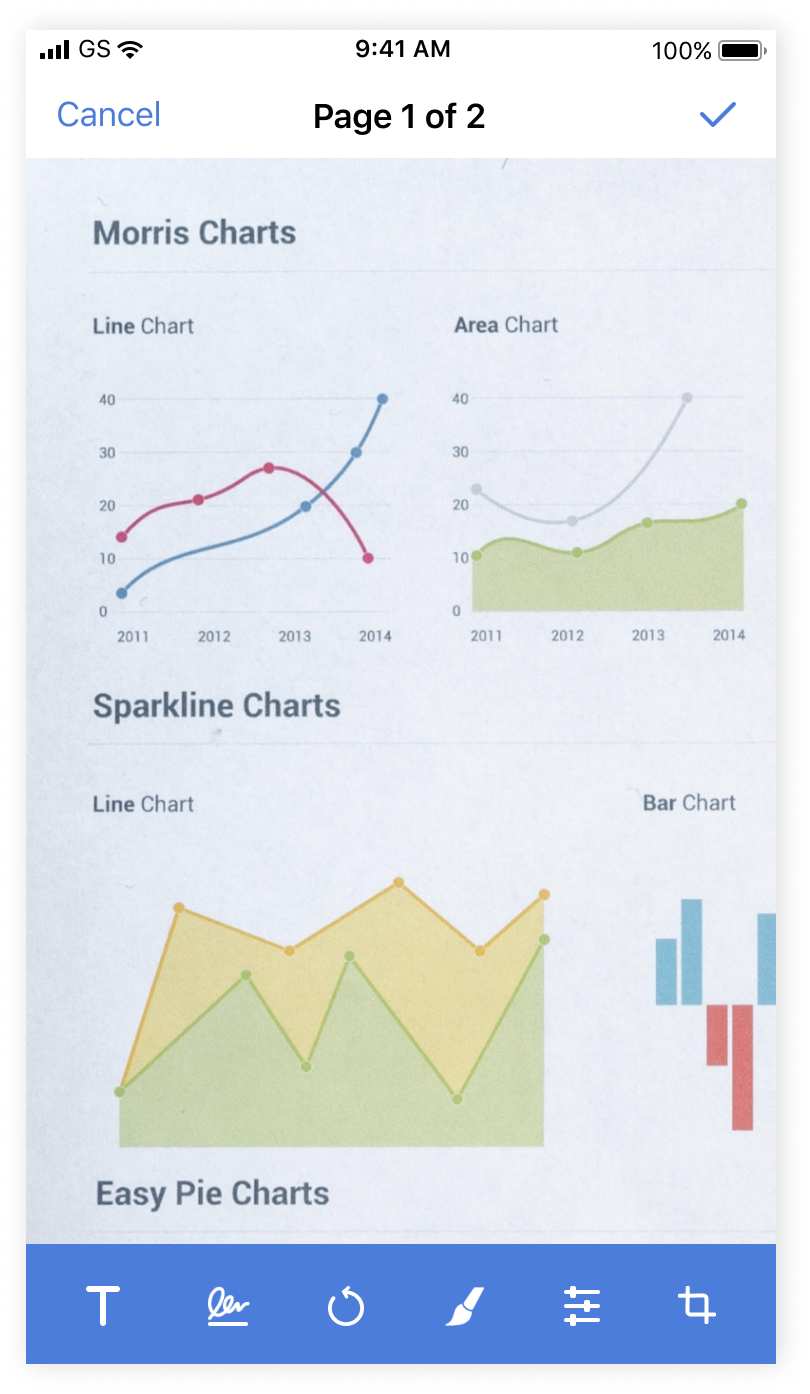
We rethought processes and user experience to make editing more convenient and understandable

man walking in front of textured wall

Icon in the bottom menu was chenged, added option to choose delete or keep documents after merging, spinner was also added.

MERGING

Before

man walking in front of textured wall

After

man walking in front of textured wall

REFLECTION

Although Smart Storage is free and impeccably performs it's main functions, like optical character recognition and safe storage, it works really quickly even with high-quality documents, the app had many shortcomings that disturbed users. I'm happy to overcome product owner expectations, because I decided not only worked on the visual side of the app, which was my only task, but also independently put forward hypotheses, rethought the user workflow and cause-effect relationships, conducted research and presented the final project.

We received positive feedback from the customer and users, although the app hasn't been radically changed the interface became more user-friendly and modern, and photo editing functionality more convenient. iOS App Store rating lifted from 3.8 to 4.5 stars. We started working on the Android version.

Next project

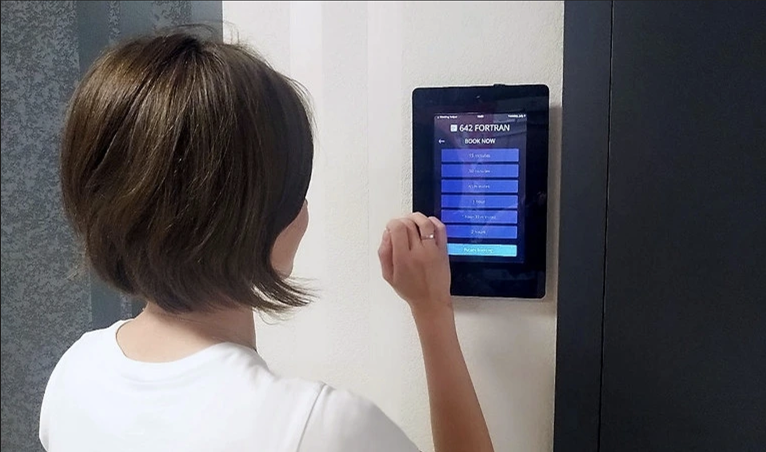
Mobile booking app

Little Helper

As the first in‑house designer, I established a structured design process, replacing ad‑hoc practices. Delivered a platform rebrand, improved overall UX based on research and metrics, and introduced new features that received highly positive feedback from clients.

Read case study

blurry photo of sunset over ocean with logo on top

Let's keep in touch

elena.1337.mochalova@gmail.com

LinkedIn

Mobile app for document management for the US market

Smart Storage

man walking in front of textured wall

CONTEXT

Smart Storage allows you to create single or multipage documents and organise them in folders. You can easily share these high-quality documents and also perform optical character recognition.

KEY RESULTS

iOS App Store rating

from 3.8 to 4.5 stars

CHALLENGES& GOALS

  • Investigate, analyze and solve UX problems
  • Update UI and redraw icons

CLIENT

American multinational financial services corporation, one of the largest asset managers in the world

TEAM

Designer (me) and iOS Engineer

MY ROLE

Researching, prototyping, user-testing, UX and UI design

My task was to redesign user interface with only focus on visual design. But I decided to figure out some user experience problems.Smart Storage is a popular app between real estate agents of one US financial corporation, but it can be used not only amongst them.

RESEARCH

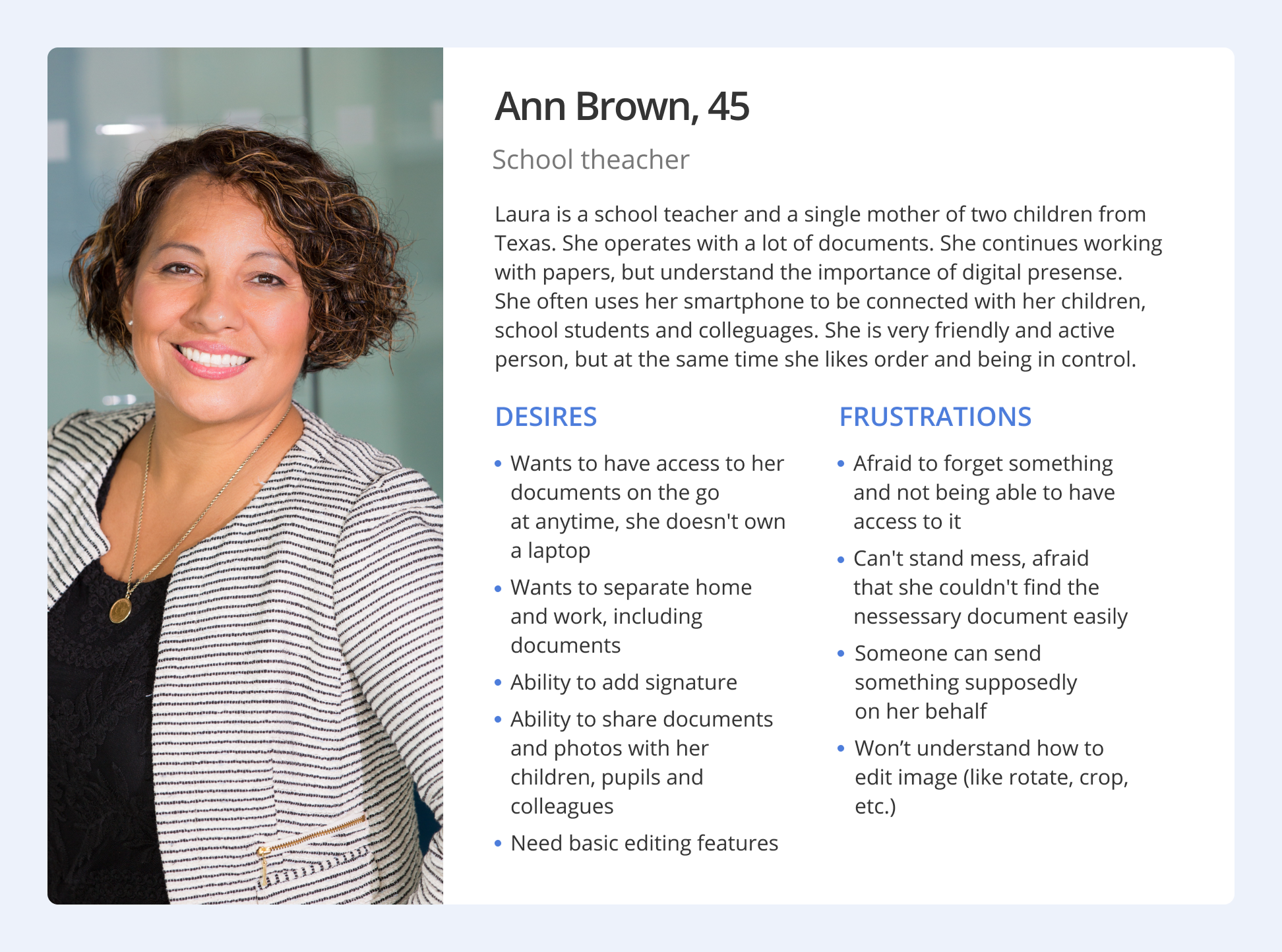
I wanted to dive fresh into the problem by getting to know what people using this app thought in order to understand the bigger picture. After interviewing, I lead the assembly and my findings into Personas to visualise the picture to focus on specific questions current and future users needs.
man walking in front of textured wall

DEFININGTHE PROBLEM

How might we reimagine a system for creating, editing, delivery and storage documents and images that can help real estate agents (main number of users), increase number of finance students users and interest teachers and school administration workers (potential users)?

Product goals

ACCESSIBLE

The feature can easily be found and accessed.

EFFICIENT

The process is smooth and frictionless to save time.

Long term goals

FOCUSED TASKS

With their worries diminished, users can now focus on more important tasks.

COLLABORATIVE ENVIRONMENT

The app offers better document sharing and more consistent information delivery, helping users save time.

Due to pain points like complicated editing workflows, inconsistent user experiences, Android-inspired elements in the iOS app, and mismatched icons, the need for a redesign became clear. Beyond updating the visual style I re-evaluated the underlying processes and their cause-effect logic.

IDEATION

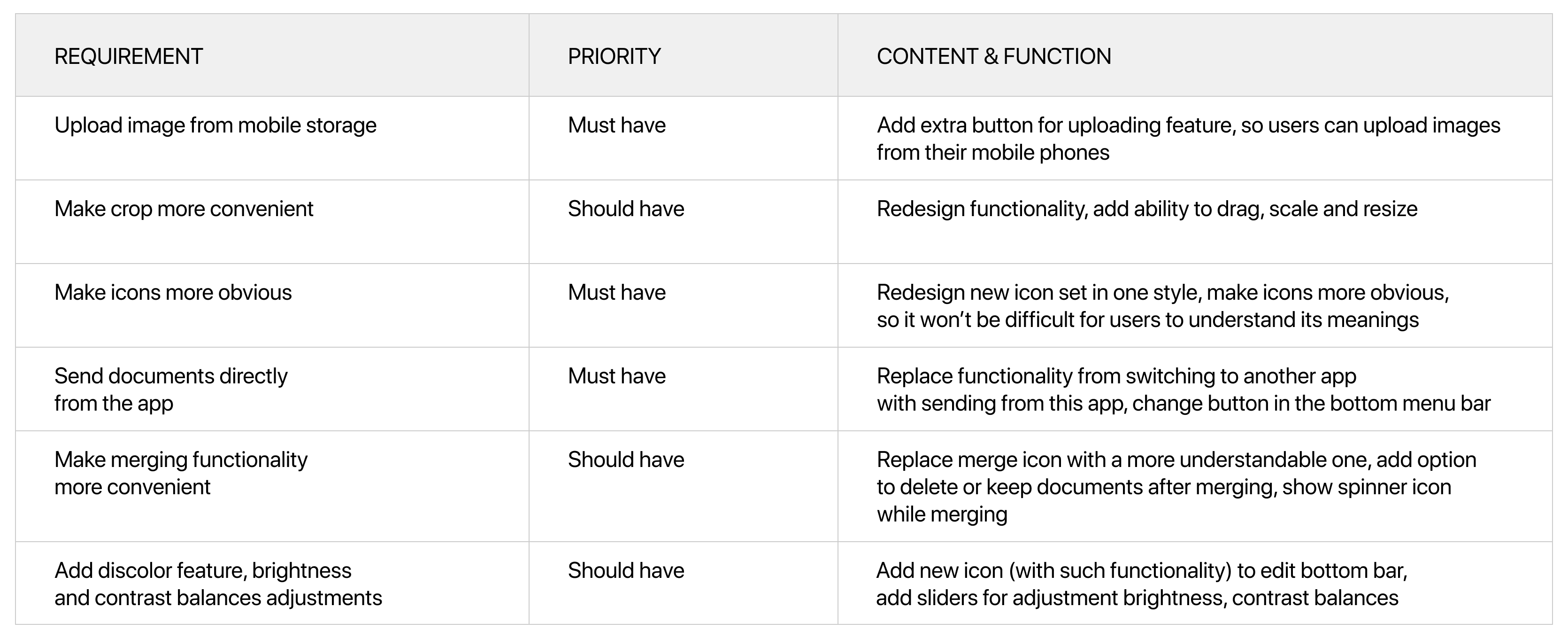
With these goals in mind, we brainstormed a map of features along with a feature list in order to understand how the system could work in a broader lens while considering the three target audiences. We have established what current functionality can remain as it is, what can be fixed, and what new features to add.
man walking in front of textured wall

I was responsible with redesigning all screens for the app, considering the last iOS guidelines and technical limitations. I developed new visual style and added new features.

WIREFRAMING

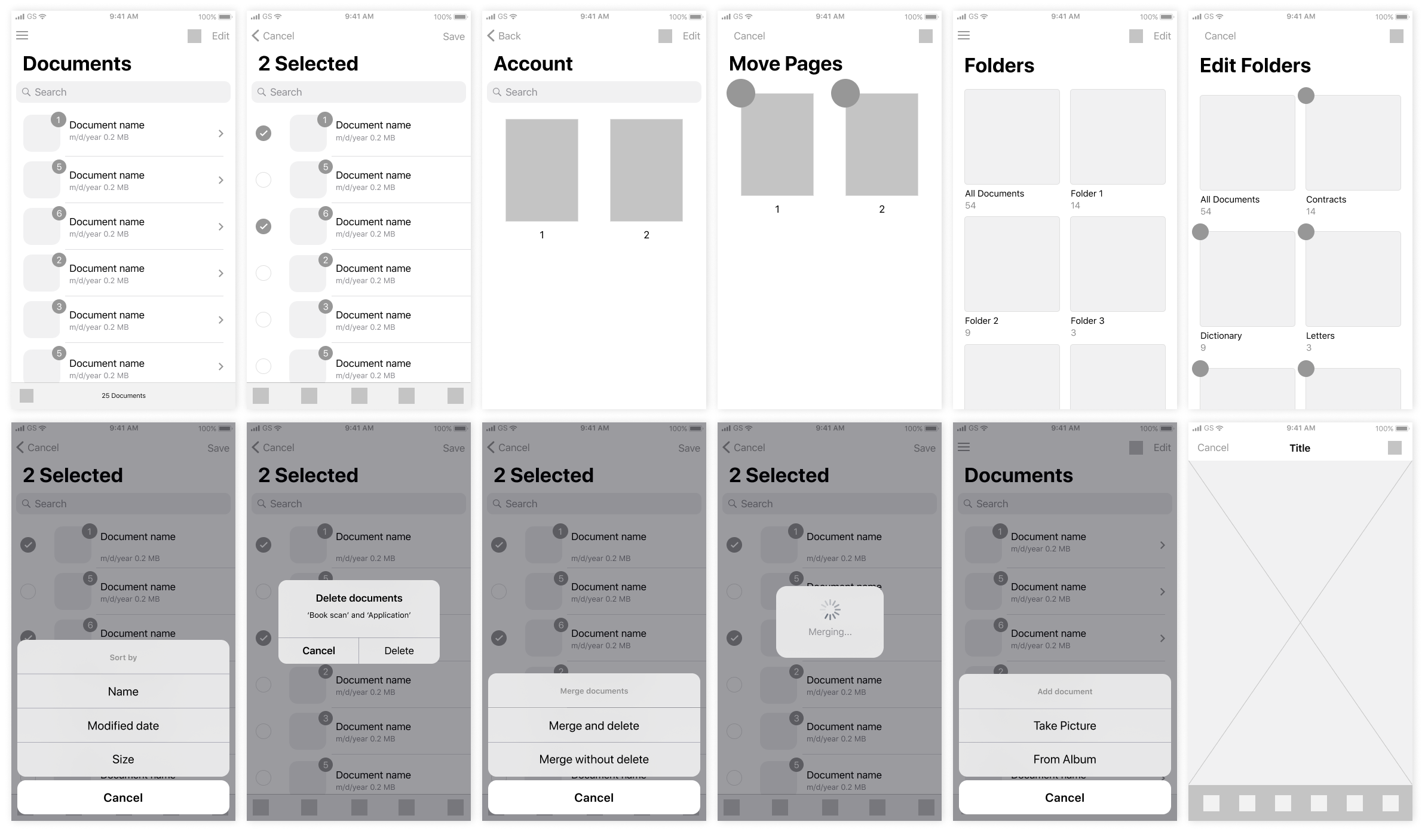
We decided to design wireframes and mockups for Iphone 8, because according to our statistics this is the most popular resolution among users of the app, after customer approval we made versions for other resolutions.
man walking in front of textured wall

PROGRESS

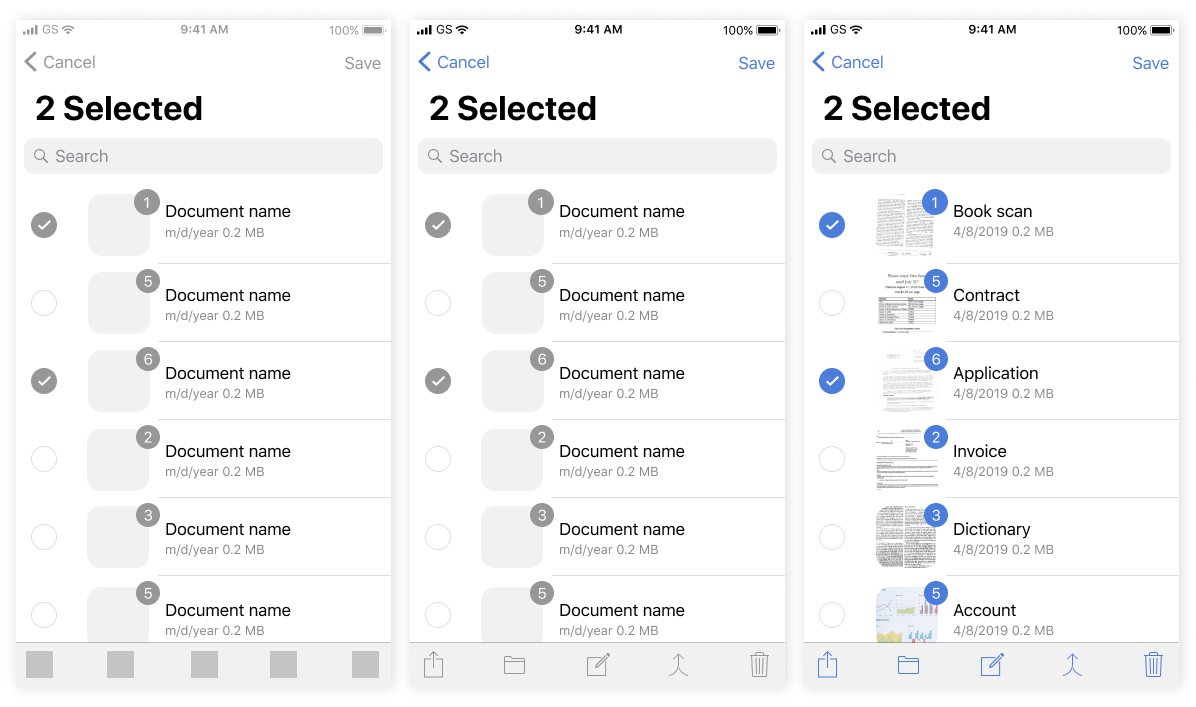
From wireframes to detailed mockups.
man walking in front of textured wall

USER TESTING

We got an opportunity to grab feedback by organising real-life scenarios and tasks for our focus group of 6 people to find out do they understand the process of document editing and icon meanings. They spoke aloud their thoughts while using the app. We received very constructive feedback which helped us to redraw some icons and screens and direct our product to the next step.

MAIN FINDINGS

  • The flow could be more efficient with evaluating the number of touch-points and time spent
  • Guidelines are important, because users have specific habits and expectations from the app

Final outcome

DOCUMENTS

Person can view all documents, counter means the number of pages in this documents.


By long tap user can select a few documents and edit them using the bottom menu.

man walking in front of textured wall

Document can be sent in several ways, person can see 'send' icon by swiping or long tapping on the Documents view or from the page of the document itself.

man walking in front of textured wall

MERGING

Icon in the bottom menu was chenged, added option to choose delete or keep documents after merging, spinner was also added.

man walking in front of textured wall

UPLOAD IMAGE

Now person can upload documents from mobile storage to the app.

EDIT DOCUMENT

We rethought processes and user experience to make editing more convenient and understandable

man walking in front of textured wall

Before

man walking in front of textured wall

After

man walking in front of textured wall

REFLECTION

Although Smart Storage is free and impeccably performs it's main functions, like optical character recognition and safe storage, it works really quickly even with high-quality documents, the app had many shortcomings that disturbed users. I'm happy to overcome product owner expectations, because I decided not only worked on the visual side of the app, which was my only task, but also independently put forward hypotheses, rethought the user workflow and cause-effect relationships, conducted research and presented the final project.

We received positive feedback from the customer and users, although the app hasn't been radically changed the interface became more user-friendly and modern, and photo editing functionality more convenient. iOS App Store rating lifted from 3.8 to 4.5 stars. We started working on the Android version.

Next project

Mobile booking app

Little Helper

Built a daily-use mobile booking app for 400+ colleagues, enabling teams and managers to reserve rooms for meetings.

Read case study

blurry photo of sunset over ocean with logo on top

Let's keep in touch

elena.1337.mochalova@gmail.com

LinkedIn

Mobile app for document management for the US market

Smart Storage

man walking in front of textured wall

CONTEXT

Smart Storage allows you to create single or multipage documents and organise them in folders. You can easily share these high-quality documents and also perform optical character recognition.

KEY RESULTS

iOS App Store rating

from 3.8 to 4.5 stars

CHALLENGES & GOALS

  • Investigate, analyze and solve UX problems
  • Update UI and redraw icons

CLIENT

American multinational financial services corporation, one of the largest asset managers in the world

TEAM

Designer (me) and iOS Engineer

MY ROLE

Researching, prototyping, user-testing, UX and UI design

My task was to redesign user interface with only focus on visual design. But I decided to figure out some user experience problems.Smart Storage is a popular app between real estate agents of one US financial corporation, but it can be used not only amongst them.

RESEARCH

I wanted to dive fresh into the problem by getting to know what people using this app thought in order to understand the bigger picture. After interviewing, I lead the assembly and my findings into Personas to visualise the picture to focus on specific questions current and future users needs.

man walking in front of textured wall

DEFININGTHE PROBLEM

How might we reimagine a system for creating, editing, delivery and storage documents and images that can help real estate agents (main number of users), increase number of finance students users and interest teachers and school administration workers (potential users)?

Product goals

ACCESSIBLE

The feature can easily be found and accessed.

EFFICIENT

The process is smooth and frictionless to save time.

Long term goals

FOCUSED TASKS

With their worries diminished, users can now focus on more important tasks.

COLLABORATIVE ENVIRONMENT

The app offers better document sharing and more consistent information delivery, helping users save time.

Due to pain points like complicated editing workflows, inconsistent user experiences, Android-inspired elements in the iOS app, and mismatched icons, the need for a redesign became clear. Beyond updating the visual style I re-evaluated the underlying processes and their cause-effect logic.

IDEATION

With these goals in mind, we brainstormed a map of features along with a feature list in order to understand how the system could work in a broader lens while considering the three target audiences. We have established what current functionality can remain as it is, what can be fixed, and what new features to add.

man walking in front of textured wall

I was responsible with redesigning all screens for the app, considering the last iOS guidelines and technical limitations. I developed new visual style and added new features.

WIREFRAMING

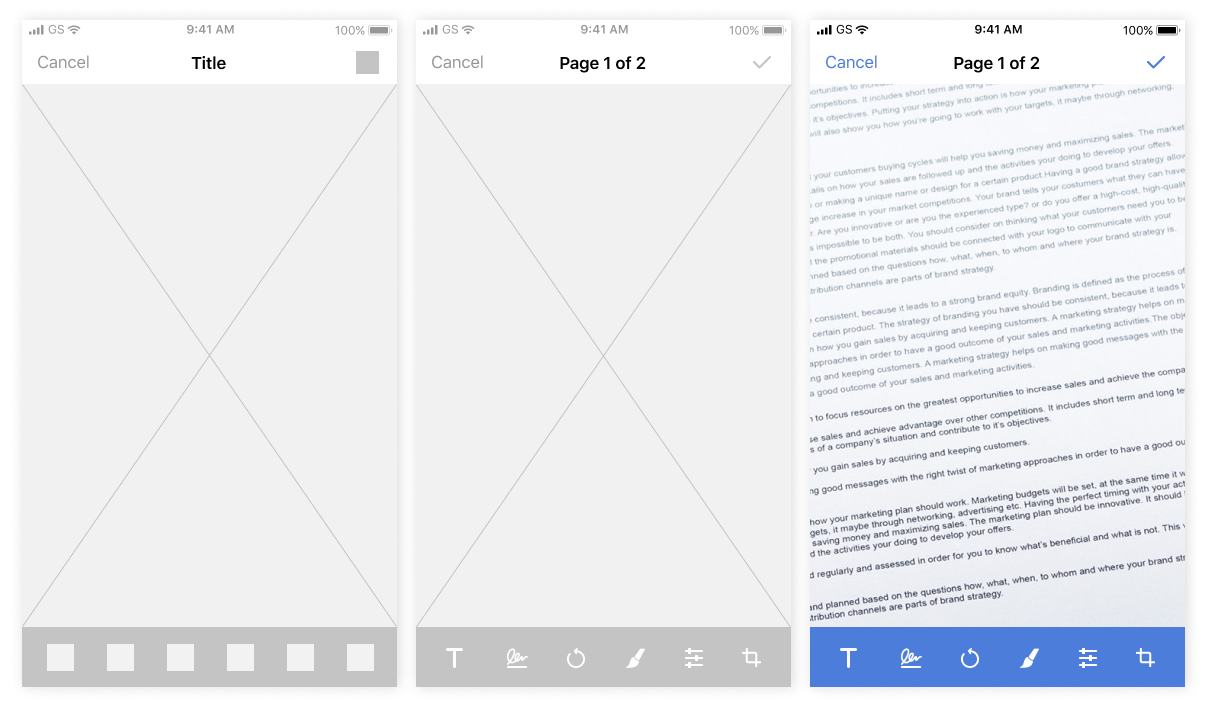
We decided to design wireframes and mockups for Iphone 8, because according to our statistics this is the most popular resolution among users of the app, after customer approval we made versions for other resolutions.

man walking in front of textured wall

PROGRESS

From wireframes to detailed mockups.
man walking in front of textured wall

USER TESTING

We got an opportunity to grab feedback by organising real-life scenarios and tasks for our focus group of 6 people to find out do they understand the process of document editing and icon meanings. They spoke aloud their thoughts while using the app. We received very constructive feedback which helped us to redraw some icons and screens and direct our product to the next step.

MAIN FINDINGS

  • The flow could be more efficient with evaluating the number of touch-points and time spent
  • Guidelines are important, because users have specific habits and expectations from the app

Final outcome
man walking in front of textured wall

DOCUMENTS

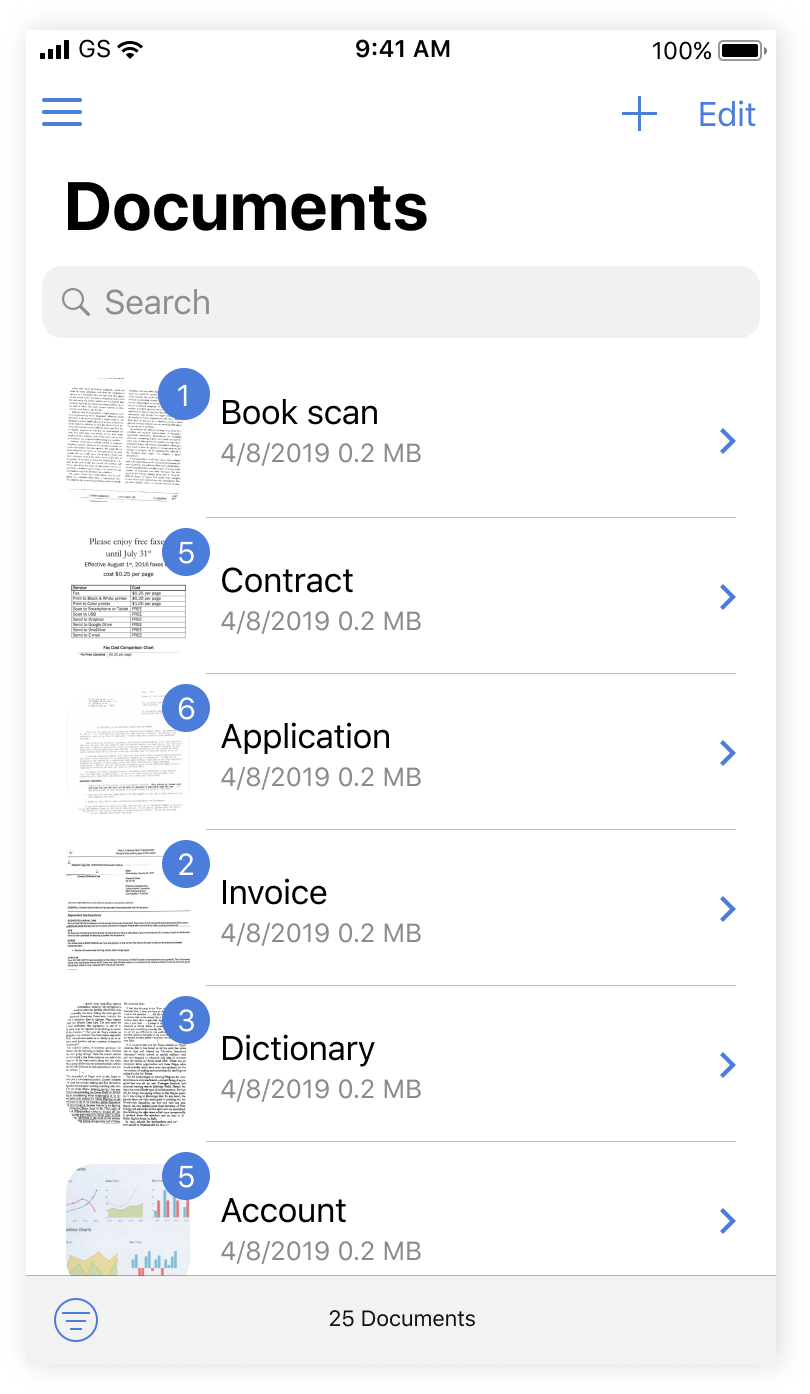
Person can view all documents, counter means the number of pages in this documents.


By long tap user can select a few documents and edit them using the bottom menu.

man walking in front of textured wall

Document can be sent in several ways, person can see 'send' icon by swiping or long tapping on the Documents view or from the page of the document itself.

man walking in front of textured wall

MERGING

Icon in the bottom menu was chenged, added option to choose delete or keep documents after merging, spinner was also added.

man walking in front of textured wall

UPLOAD IMAGE

Now person can upload documents from mobile storage to the app.

man walking in front of textured wall

EDIT DOCUMENT

We rethought processes and user experience to make editing more convenient and understandable

man walking in front of textured wall

Before

man walking in front of textured wall

After

man walking in front of textured wall

REFLECTION

Although Smart Storage is free and impeccably performs it's main functions, like optical character recognition and safe storage, it works really quickly even with high-quality documents, the app had many shortcomings that disturbed users. I'm happy to overcome product owner expectations, because I decided not only worked on the visual side of the app, which was my only task, but also independently put forward hypotheses, rethought the user workflow and cause-effect relationships, conducted research and presented the final project.

We received positive feedback from the customer and users, although the app hasn't been radically changed the interface became more user-friendly and modern, and photo editing functionality more convenient. iOS App Store rating lifted from 3.8 to 4.5 stars. We started working on the Android version.

Next project

Mobile booking app

Little Helper

Built a daily-use mobile booking app for 400+ colleagues, enabling teams and managers to reserve rooms for meetings.

Read case study

blurry photo of sunset over ocean with logo on top

Let's keep in touch

elena.1337.mochalova@gmail.com

LinkedIn